OpenAI Playground is a web interface for trying GPT prompts, adjusting model settings, and seeing how those choices change generated results. Think of it as a control panel for prompt experiments—minus the ominous red button. section 2.0 section 2.2
Its most useful features are:
- Configuration controls for settings such as temperature, presence penalties, and Best Of. section 2.14
- A one-exchange prompt workflow in Chat mode, rather than ChatGPT-style conversation history. section 2.2
- View Code, which exposes the selected model, prompt, and configuration as API code. section 2.3
From experiment to runnable prompt
Enter a prompt, choose a model, adjust the controls, and select View Code with Python enabled. The generated code includes the prompt and configuration; add a valid API key, then copy, run, or modify it on an internet-connected computer. This turns casual tinkering into a repeatable API workflow. section 2.3 section 2.14
Figure 2.2 OpenAI’s Playground interface
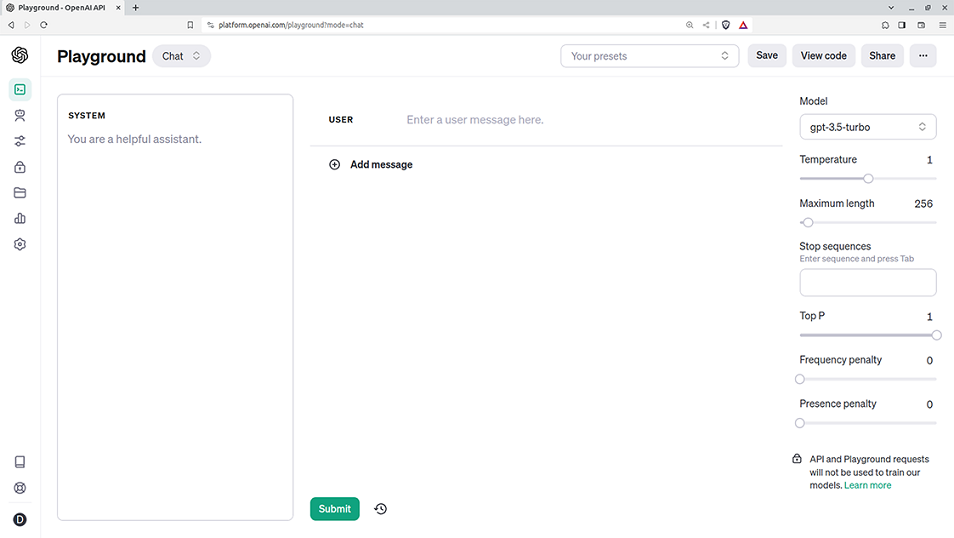
Use the interface figure to orient yourself to the prompt area, model selection, and configuration controls. section 2.2
Figure 2.3 The Playground’s View Code tool with Python code
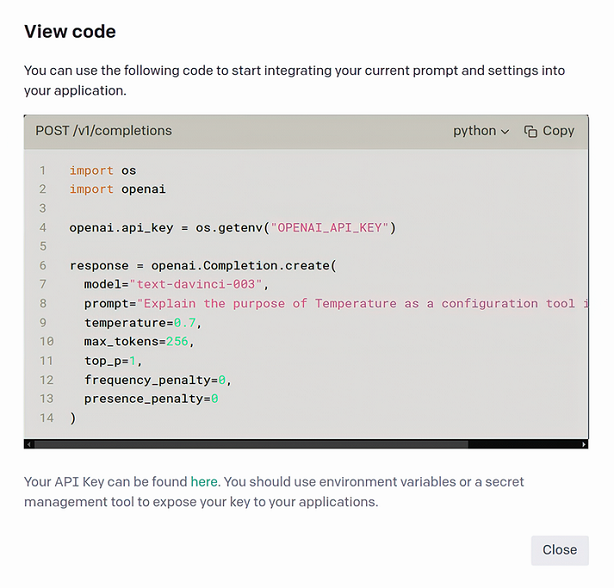
Use the View Code figure to inspect how a configured Playground session becomes Python API code. section 2.3

