An operating system (OS) is the software layer beneath an application and above Azure compute resources such as virtual machines. OS data helps security teams detect suspicious activity as part of a defense-in-depth approach. section 9.1
Collecting OS data requires an agent. Azure provides the Azure Monitoring agent (AMA), which monitors Windows and Linux VMs and replaces the earlier Log Analytics, Microsoft Monitoring, and Operations Management Suite agents. section 9.1.4
Before installing AMA, verify the following:
- Assign suitable VM, connected-machine, and Log Analytics permissions. section 9.1.4
- Provide VM access to the required Azure Monitor and Log Analytics HTTPS endpoints. section 9.1.4
- Enable a user-assigned or system-assigned managed identity on each VM. section 9.1.4
- Use data collection rules when performance and security events must be sent to different Log Analytics workspaces. section 9.1.4
Install AMA on an Azure VM
Run Azure CLI with the AzureMonitorWindowsAgent extension, the Microsoft.Azure.Monitor publisher, the VM resource ID, automatic upgrades enabled, and managed-identity settings. Replace the placeholder resource identifiers with your environment's values. section 9.1.4
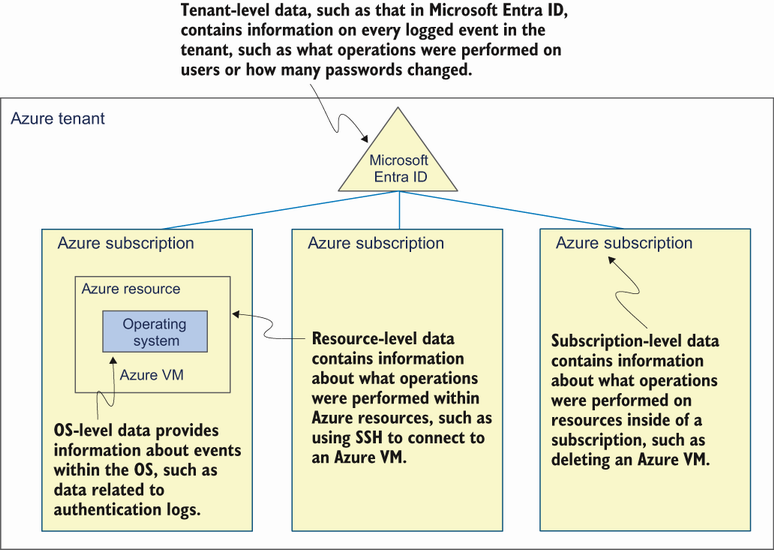
Use the layered diagram to relate application, OS, compute, container, Azure platform, subscription, and tenant log sources. section 9.1



