The Python standard-library `os` module provides filesystem operations and pathname tools. Use it to find the current directory, inspect files, traverse directories, and create or rename filesystem entries. Its `os.path` functions assemble and examine pathnames. section 12.7
Paths matter when the working directory changes: a relative filename is interpreted from the current directory, while an absolute pathname can still identify the same file after a directory change. `os.getcwd()` obtains the current directory, and `os.path.join()` combines pathname components. section 3.2.7
Common operations fit together in a directory-processing task:
- `os.walk()` visits directories and supplies each directory’s files; `os.path.join()` builds each file’s path. section 12.6.2
- `os.path.splitext()` checks an extension, `os.path.islink()` excludes symbolic links, and `os.path.getsize()` supplies file sizes. section 12.6.2
- `os.makedirs(..., exist_ok=True)` creates a backup directory if needed. A matching file can then be moved with `os.rename()` or `shutil.move()`. section 12.6.2
Total the size of .test files
import os size = 0 for root, dirs, files in os.walk(os.curdir): for name in files: path = os.path.join(root, name) if not os.path.islink(path) and os.path.splitext(name)[1] == '.test': size += os.path.getsize(path) print(size) To extend this into a backup script, create the destination before walking and avoid processing files already in that destination. section 12.6.2
`pathlib` offers an alternative built around `Path` objects. Its recursive search, symlink check, and file-size methods can express the same task without combining separate `os` and `os.path` calls; choose the approach that makes the operation clearer. section 12.6.2
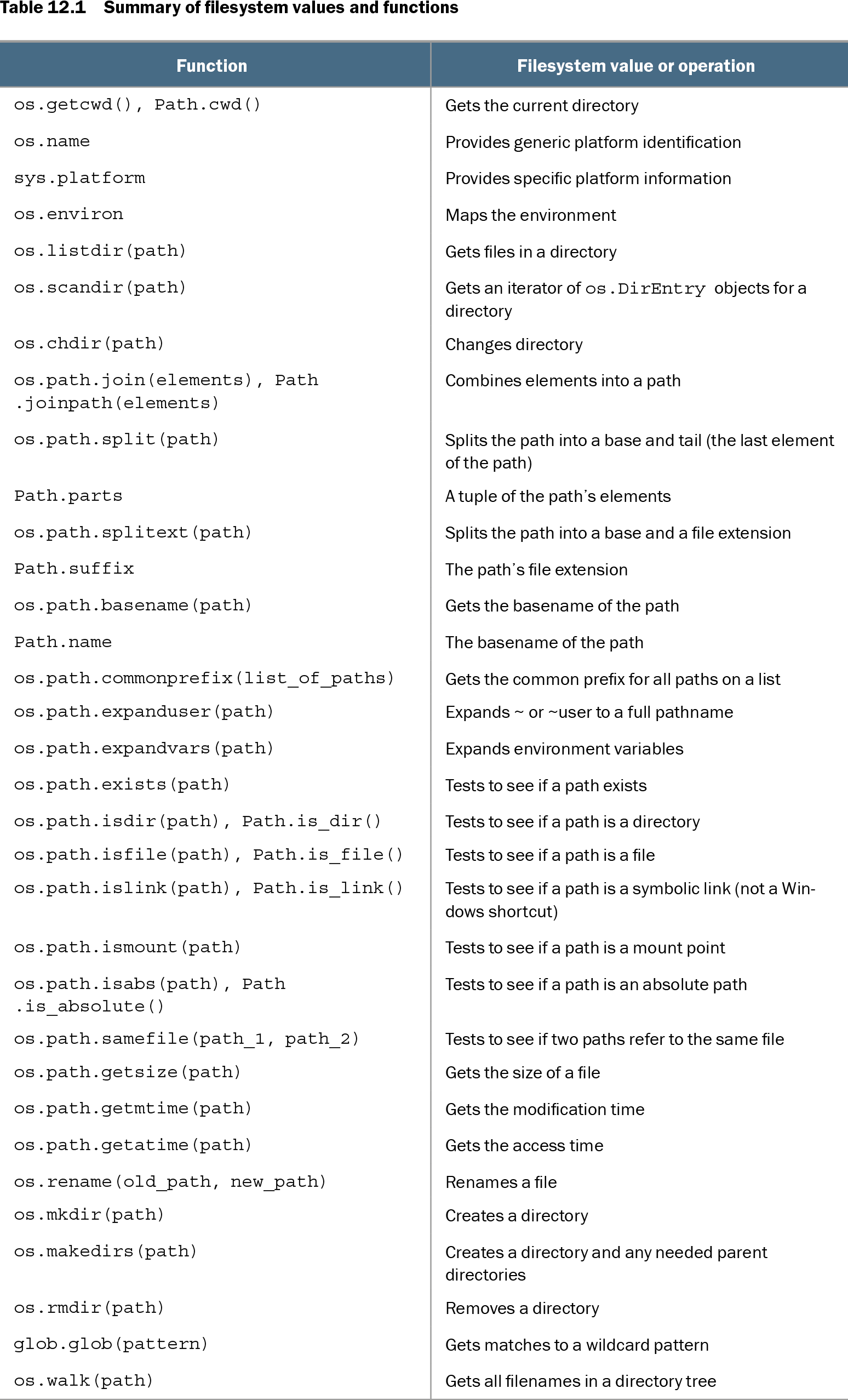
Table 12.1 Summary of filesystem values and functions (view table figure)
| Function |
Filesystem value or operation |
|---|---|
| os.getcwd(), Path.cwd() |
Gets the current directory |
| os.name |
Provides generic platform identification |
| sys.platform |
Provides specific platform information |
| os.environ |
Maps the environment |
| os.listdir(path) |
Gets files in a directory |
| os.scandir(path) |
Gets an iterator of os.DirEntry objects for a directory |
| os.chdir(path) |
Changes directory |
| os.path.join(elements), Path.joinpath(elements) |
Combines elements into a path |
| os.path.split(path) |
Splits the path into a base and tail (the last element of the path) |
| Path.parts |
A tuple of the path’s elements |
| os.path.splitext(path) |
Splits the path into a base and a file extension |
| Path.suffix |
The path’s file extension |
| os.path.basename(path) |
Gets the basename of the path |
| Path.name |
The basename of the path |
| os.path.commonprefix(list_of_paths) |
Gets the common prefix for all paths on a list |
| os.path.expanduser(path) |
Expands ~ or ~user to a full pathname |
| os.path.expandvars(path) |
Expands environment variables |
| os.path.exists(path) |
Tests to see if a path exists |
| os.path.isdir(path), Path.is_dir() |
Tests to see if a path is a directory |
| os.path.isfile(path), Path.is_file() |
Tests to see if a path is a file |
| os.path.islink(path), Path.is_link() |
Tests to see if a path is a symbolic link (not a Windows shortcut) |
| os.path.ismount(path) |
Tests to see if a path is a mount point |
| os.path.isabs(path), Path.is_absolute() |
Tests to see if a path is an absolute path |
| os.path.samefile(path_1, path_2) |
Tests to see if two paths refer to the same file |
| os.path.getsize(path) |
Gets the size of a file |
| os.path.getmtime(path) |
Gets the modification time |
| os.path.getatime(path) |
Gets the access time |
| os.rename(old_path, new_path) |
Renames a file |
| os.mkdir(path) |
Creates a directory |
| os.makedirs(path) |
Creates a directory and any needed parent directories |
| os.rmdir(path) |
Removes a directory |
| glob.glob(pattern) |
Gets matches to a wildcard pattern |
| os.walk(path) |
Gets all filenames in a directory tree |
Compare `os` filesystem and pathname functions with corresponding `pathlib` operations. section 12.7