A performance bottleneck is a component or operation that limits throughput or creates excessive delay under load. In a RAG application, it may appear as a 429 rate-limit error, a missing API response, or answers that take around ten seconds to return. section 5.4.3
Diagnose bottlenecks through a load-testing and remediation loop:
- Run Locust tests until failures or unacceptable latency reveal the constrained component. section 5.4.3 section 5.5
- Inspect Web App logs to identify whether the problem is API rate limiting, insufficient application capacity, or another failing stage. section 5.4.3 section 5.5
- Scale only the constrained resource: raise token quotas or use Azure OpenAI, add Web App CPU and memory, increase instances, or raise AI Search capacity. section 5.4.3 section 5.5
- Reduce demand as well as adding capacity; shrinking search results from four chunks to two lowers token consumption and cost. section 5.4.3
Figure 5.7 If we experience any failures during out Locust tests, we first look at our logs in our web app. Next, once we have identified the error, we fix it by scaling out that particular part of our system. For example, if we are getting rate limits from OpenAI, we increase the amount of requests we can send.
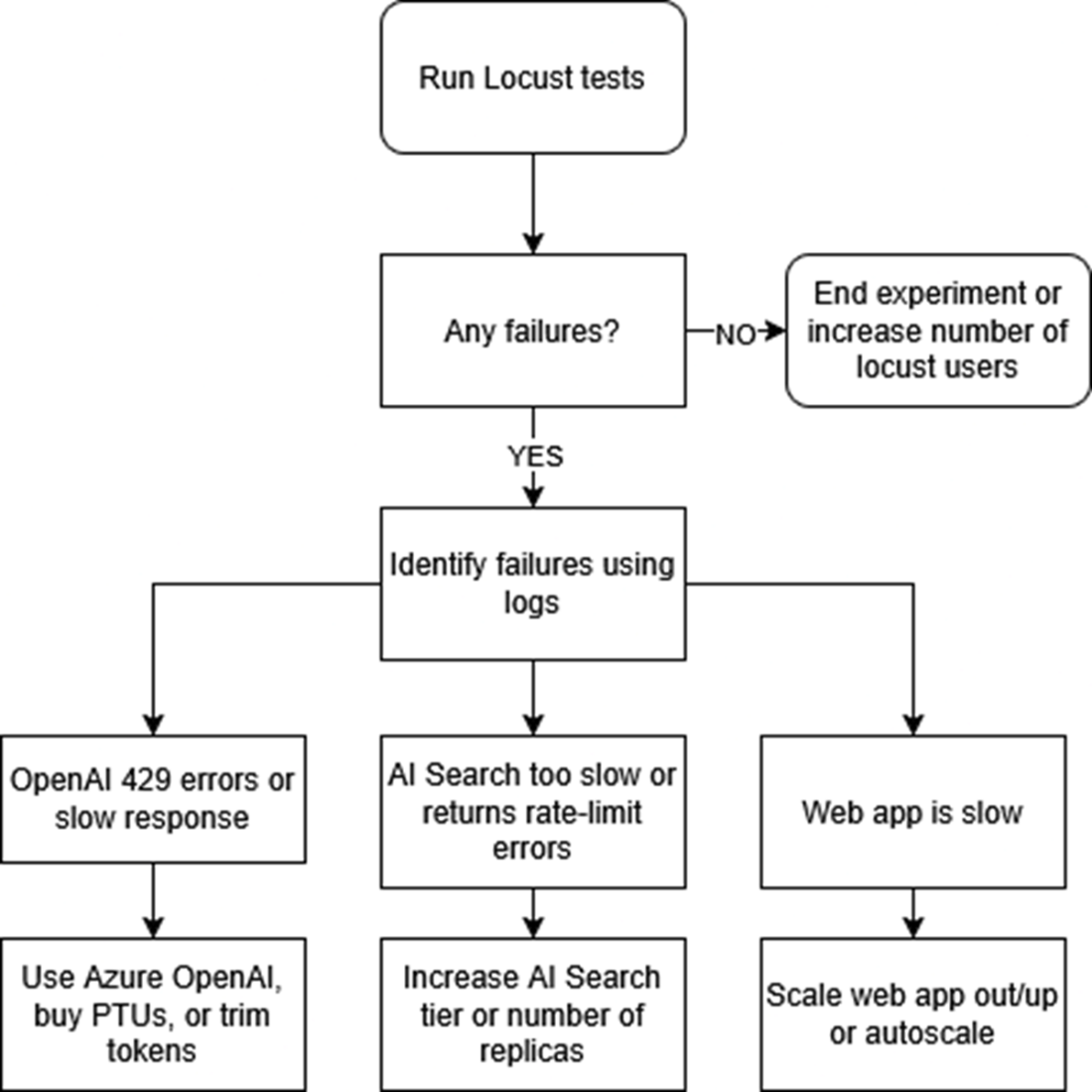
Use the diagnostic flow to connect Locust failures with application logs, identify the failing subsystem, and scale that subsystem rather than the entire system. section 5.4.3