A pod is Kubernetes’ smallest deployable computing unit: an isolated execution environment that runs one or more containers as a logical host. It represents a function unit and carries a computing-resource guarantee, allowing multiple pods to share a server while keeping CPU, memory, and disk requirements within that node’s limits. section 1.2.5 section 3.4.2
Pods connect desired state to running resources. Creating a pod resource object declares containers and attached storage; a controller provisions them, updates status, and removes the actual containers when the desired object is deleted. This reconciliation model makes pods manageable through the Kubernetes API rather than direct host administration. section 3.4.2
Use pods where isolated, schedulable execution is needed:
- Run training processes. A job tracker creates one pod for single-device training or multiple pods for distributed training, passing each process its own parameters. section 4.3.3
- Run workflow steps. Argo Workflows turns each task into a dynamically launched pod, isolating steps by container and pod while passing dependent files between them. section 9.3.2
- Recover from failures. Kubernetes can restart, replace, or reschedule failed pods and terminate pods that fail configured health checks. section 1.2.5
A pod’s address is not durable: it can be destroyed, recreated on another node, and receive a different IP address. In distributed PyTorch training, create a Kubernetes Service for the master pod and give workers its DNS name instead of relying on the master pod IP. section 4.3.3
Launching distributed training pods
For a training world size of three, create three pods, one process per pod. Assign rank 0 to the master and ranks 1 and 2 to workers; pass WORLD_SIZE, RANK, MASTER_ADDR, and MASTER_PORT to each. MASTER_ADDR names the Service for the master, so every process can initialize the training group even if the master pod is recreated. section 4.3.3
Figure 4.4 The workflow for launching a training job in Kubernetes: step 1, detects the waiting job in the job queue; step 2, creates Kubernetes pods to run training; and step 3, moves the job from the job queue to the launching list.
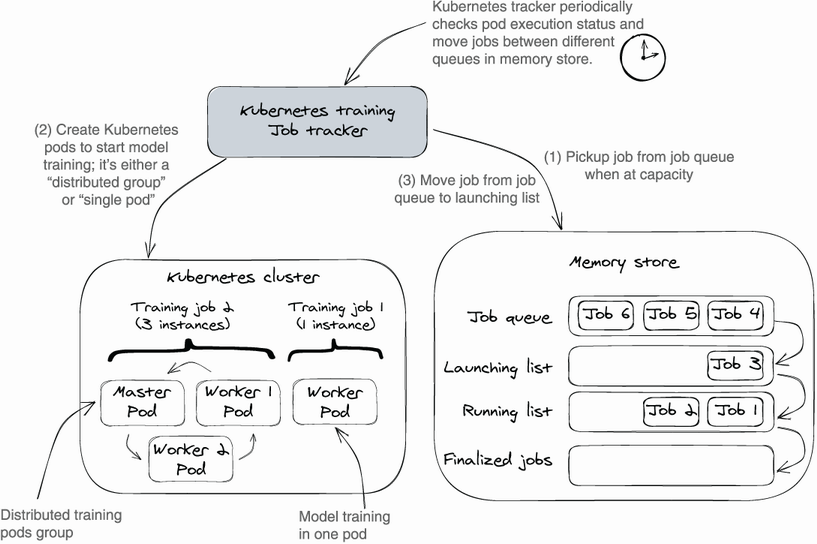
This workflow shows the job tracker detecting queued work, creating training pods when capacity is available, and moving the job into the launching state. section 4.3.3
Pod isolation and automation have operational costs. Pods consume CPU and memory beyond the resources required by their containers. Capacity planning therefore accounts for both workload requirements and Kubernetes overhead, while namespaces can apply resource quotas to separate teams within one physical cluster. section 1.2.5














