When you deploy a containerized application, Kubernetes needs a unit it can place on a machine. That unit is a Pod: one or more containers scheduled together. Most Pods contain one container; tightly coupled containers, such as an application and a logging sidecar, can share one Pod. section 3.1.2
A Pod has a distinct job among Kubernetes objects:
- The Pod defines the containers to run and their resource needs. Kubernetes places it on a node with enough capacity. section 3.1.2
- A Deployment wraps a Pod definition and specifies how many replicas should run. A Service provides connectivity to a group of Pods. section 1.2.1
- Labels let objects such as Deployments and Services refer to Pods. section 3.5
Containers in a Pod share a lifecycle: they are created and terminated together. They also share an IP address. Different Pods have their own IP addresses and can communicate directly within the cluster; a Service can route requests across the Pods backing it. section 3.1.2 section 7.1.1
Deploy and update three replicas
A Deployment can request three replicas of an application Pod. After you change its container image from version 1 to version 2 and apply the YAML, Kubernetes replaces the old Pods through a rolling update rather than replacing all three at once. Use `kubectl get deploy` to compare READY and UP-TO-DATE counts, or `kubectl get pods` to see individual Pods. section 3.2.7
Placement is resource-based. If a requested Pod cannot fit on a node, it remains Pending. If a node fails, Kubernetes attempts to place a replacement Pod elsewhere so a Deployment can maintain its requested replica count. Scaling that count changes the number of Pods; it does not by itself add node capacity. section 5.1 section 6.0
Figure 5.2 If one of the nodes develops a problem, health checks from the Kubernetes control plane fail. So, the scheduler creates a new Pod replica on a healthy node.
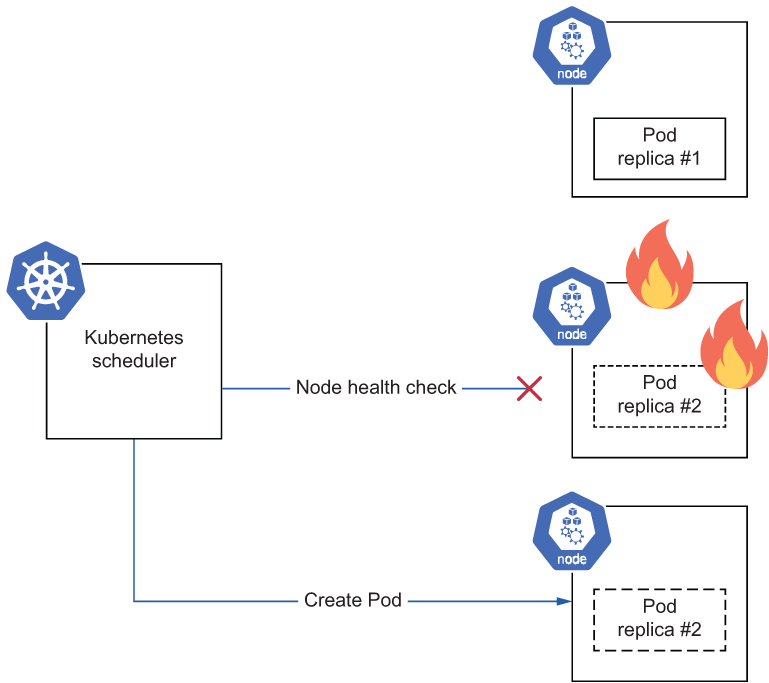
Shows a replacement Pod replica placed on a healthy node after another node develops a problem. section 5.1














