A price changelog needs each product’s updates in sequence: a later price must not be processed as though it came first. Kafka preserves message order within a partition, not across an entire topic. This distinction lets partitions spread work across brokers and consumers, but it makes partition choice part of the ordering design. section 4.2.1 section 6.1.1
To keep related updates ordered:
- Give related messages the same key, such as a product name. Key-based partitioning sends messages with that key to the same partition. section 4.2.1
- Keep the messages on the same producer and partition, and set enable.idempotence=true. Retries or failures can otherwise disturb ordering even for one producer. section 6.1.1
- When scaling a consumer group, assign whole partitions to consumers rather than distributing individual messages arbitrarily. section 6.1.1
Read a keyed price changelog
Create a two-partition topic with kafka-topics.sh --create --topic products.prices.changelog.multi-partitions-keys --partitions 2 --replication-factor 1 --bootstrap-server localhost:9092. Produce records with kafka-console-producer.sh using --property parse.key=true and --property key.separator=":". Enter coffee pads:10, cola:2, cola:1, coffee pads:11. Read from the beginning with kafka-console-consumer.sh using --property print.key=true. The product sequences remain ordered within their respective partitions; do not infer a guaranteed order between coffee pads and cola. section 4.2.1
Choose the partition count with future changes in mind. Kafka can increase a topic’s partition count but cannot reduce it. Increasing it changes the key-to-partition calculation, so later messages for a key may land in a different partition from older ones. If order cannot be lost, changing the partition count calls for a new topic and a use-case-specific migration instead. section 6.1.3
Figure 6.3 After changing the number of partitions, the partition number for a particular message key usually changes. In this example, messages with the key circle are now produced to partition 2 instead of partition 1, and messages with the key square are now produced to partition 1 instead of partition 0.
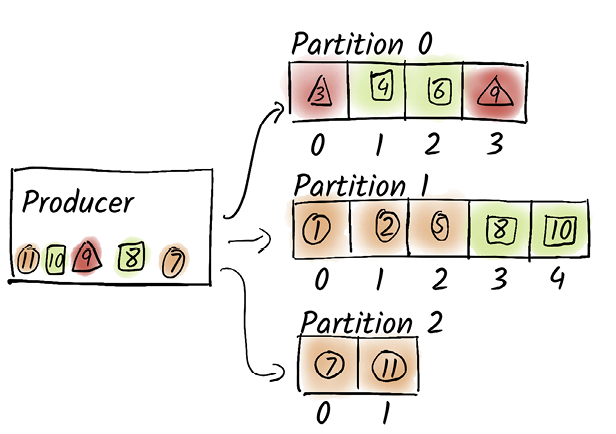
The figure shows why adding partitions can move an existing key’s future messages to a different partition. section 6.1.3







