liveBook · Manning

Order property

As explained in MongoDB 8.0 in Action, Third Edition

Event ordering is the determination of the sequence in which events occurred or should be processed.

Event ordering controls how an Atlas database trigger processes change events. Enable it to process events sequentially by timestamp; disable it to allow parallel processing for better performance. section 19.2.1

Set it when creating a trigger:

  • In the Atlas UI, open Services → Triggers and select Add Trigger. Choose Database and name the trigger. section 19.2.1
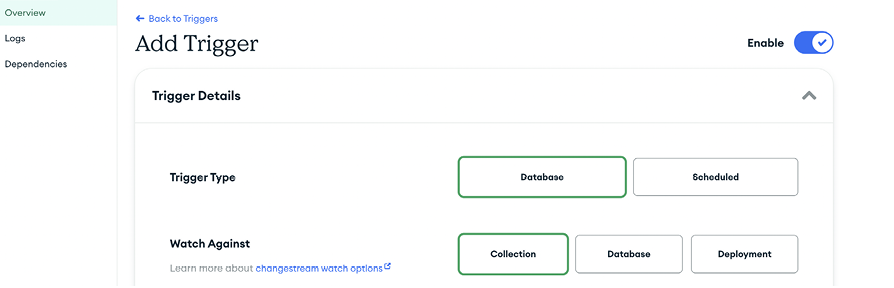
  • Set event ordering in Trigger Details, then choose the collection, database, or deployment to watch and the operation types that fire the trigger. section 19.2.1
Figure 19.5 The Add Trigger interface in Atlas. At the top, you can choose the trigger type: Database or Scheduled. In the Trigger Details section, you can set the trigger’s name, enable or disable it, choose to skip events when reenabled, and control event ordering. (Image © MongoDB 2025)
A screenshot of a computer

AI-generated content may be incorrect.

The Add Trigger interface shows where event ordering is controlled alongside the trigger’s enabled state. section 19.2.1


How MongoDB 8.0 in Action, Third Edition covers it

How deep it goes
Shows the UI setting and performance trade-off without detailing ordering internals.
Examples
Uses a trigger watching restaurant records for operations such as inserts, updates, and deletes.
What it assumes
Assumes access to an Atlas cluster while giving UI steps for creating a database trigger.
What you can do after
Operate/configure an Atlas database trigger for timestamp-ordered or parallel event processing.
How it connects
Connects database triggers and change events with timestamps and parallel processing.

Also explained in

Compare how 8 books explain Order property →

Related concepts

This explainer was generated by Manning's knowledge graph from the text of MongoDB 8.0 in Action, Third Edition. The section links point to the parts of the book it draws on.




