A primary color is a starting color used to create or organize other colors. On a traditional color wheel, red, yellow, and blue are primary colors; mixing two produces secondary colors, such as purple from red and blue. On a website, “primary color” also commonly means the chosen base color that appears most often in the interface. section 9.2.1 section 9.4
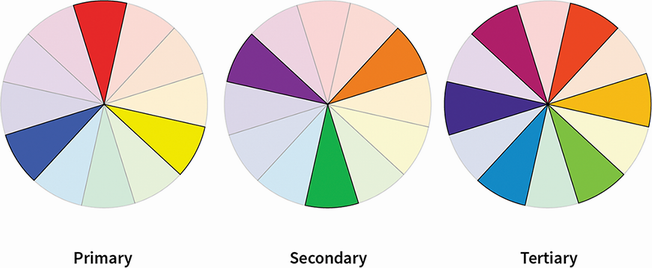
Use the color wheel to see primary, secondary, and tertiary color groups and the relationships that support palette choices. section 9.2.1
Choose one base color before assigning the rest of a UI palette. Let it dominate, add one or two accent colors, and create tints and shades from the swatches. The 60/30/10 rule offers a starting point when the balance of colors feels unclear. section 9.4
Direct attention with a violet-blue base color
A travel landing page starts with violet-blue as its primary color. Reduced-saturation versions create supporting colors, while grays retain a slight violet-blue hint. The vibrant base color goes on the main headline, search button, and checked checkboxes so the key action and feedback stand out; quieter colors support the logo and secondary information. section 9.5
Match the color model to the medium. Screens use additive RGB light, where equal red, green, and blue make white. Pigment-based CMYK instead uses cyan, magenta, yellow, and black, so the same choices can appear noticeably different after changing modes. section 9.7
Use primary color to support meaning without making color the only signal. Check text contrast for readability, and pair color-coded states with icons or labels. Consider the feeling a palette evokes as well as whether its intensity could push people away. section 9.9

