A map stores values under keys rather than list positions. Python calls its built-in map a dictionary, or `dict`, and implements it with a hash table. Use one when a meaningful key—such as a word or a pair of coordinates—makes access simpler than a positional index. section 7.0 section 7.1
Create and look up entries
`translations = {'red': 'rouge', 'blue': 'bleu'}` creates two entries. `translations['red']` gives `'rouge'`; `translations['green'] = 'vert'` adds another. Unlike assigning to an empty list at index 0, assigning to a new dictionary key needs no existing position. section 7.1
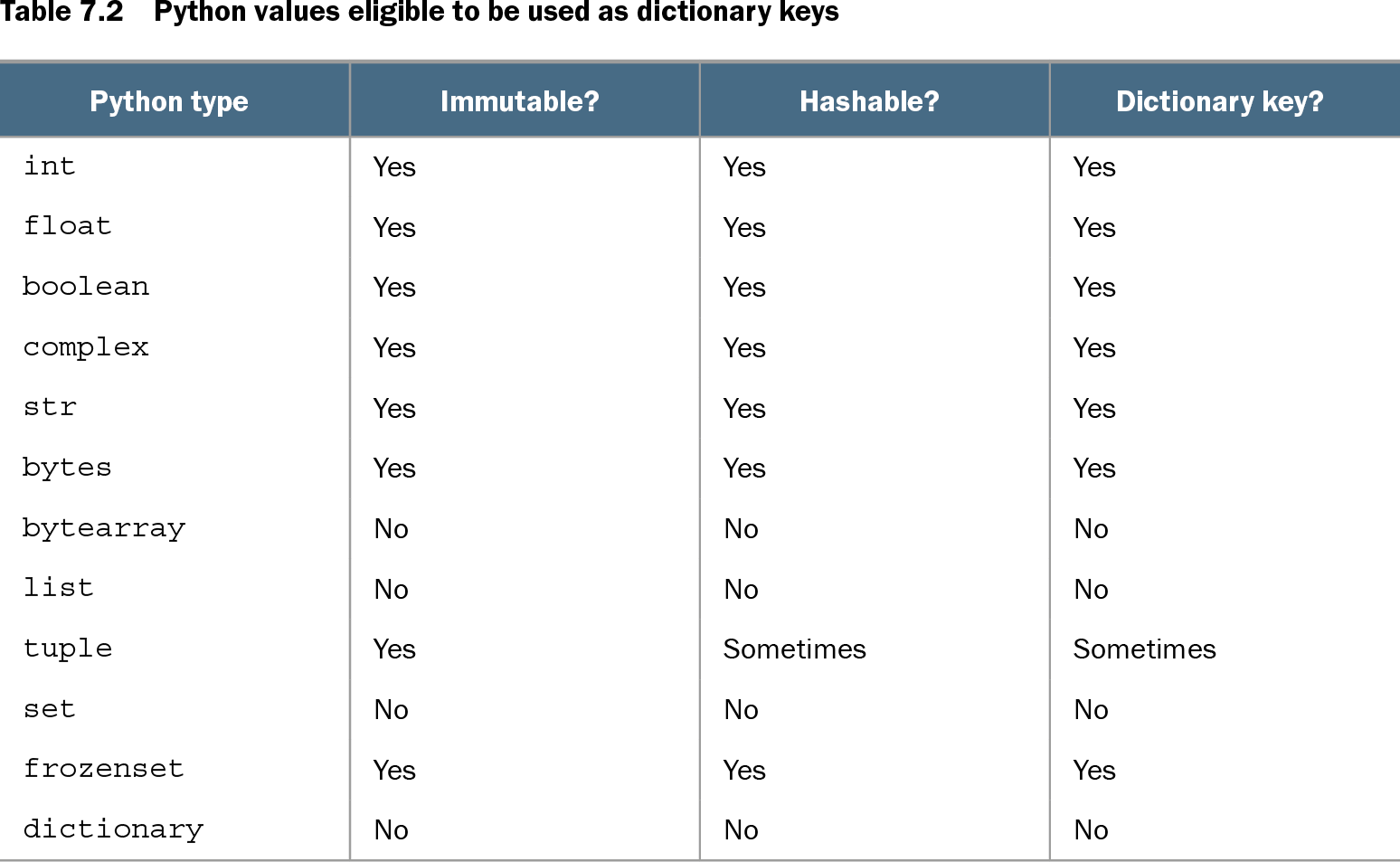
A key must be both immutable and hashable. Strings and numbers work; a tuple works only when its contents are hashable. Lists and dictionaries cannot be keys, though either can be a value. Looking up a missing key with brackets raises `KeyError`. Test with `key in mapping`, or use `mapping.get(key, default)` to return a fallback without adding an entry; `setdefault` instead adds the missing entry. section 7.4 section 7.2
Table 7.2 Python values eligible to be used as dictionary keys (view table figure)
| Python type |
Immutable? |
Hashable? |
Dictionary key? |
|---|---|---|---|
| int |
Yes |
Yes |
Yes |
| float |
Yes |
Yes |
Yes |
| boolean |
Yes |
Yes |
Yes |
| complex |
Yes |
Yes |
Yes |
| str |
Yes |
Yes |
Yes |
| bytes |
Yes |
Yes |
Yes |
| bytearray |
No |
No |
No |
| list |
No |
No |
No |
| tuple |
Yes |
Sometimes |
Sometimes |
| set |
No |
No |
No |
| frozenset |
Yes |
Yes |
Yes |
| dictionary |
No |
No |
No |
Compare built-in types before choosing a key: a tuple is eligible only when its contained values are hashable. section 7.4
Common operations:
- `len(d)` counts entries; `del d[key]` removes one. section 7.2
- `d.keys()`, `d.values()`, and `d.items()` provide dynamic views for iteration; `items()` supplies key-value pairs. section 7.2
- `d.copy()` makes a shallow copy; `d.update(other)` incorporates another dictionary’s entries, replacing values for shared keys. section 7.2
Count words
`counts = {}` `for word in 'To be or not to be'.split():` ` counts[word] = counts.get(word, 0) + 1` The result gives `'be'` a count of 2. Capitalization matters here: `'To'` and `'to'` are separate keys. For this common pattern, the standard library also provides `collections.Counter`. section 7.3
Keys can encode more than labels. Store only nonzero matrix entries under `(row, column)` tuples and use `matrix.get((row, column), 0)` for an absent cell. A tuple of function arguments can likewise key cached results, avoiding repeated calculations. For extensive matrix work, consider NumPy instead. section 7.5 section 7.6
Dictionary items retain insertion order starting with Python 3.6; earlier versions did not guarantee the order shown by `keys()`. Access an item by its key, not its position. Prefer a dictionary over a list when it expresses the problem more cleanly, and reconsider only if performance proves unacceptable. section 7.1 section 7.7