Qualitative data is nonnumeric, free-form information: the words people use to describe their attitudes, behaviors, needs, opinions, and experiences. It supplies the context behind a user action, helping a team understand not only that something happened but why it may have happened. section 4.2.1
Use it early when a new project has little or no numerical evidence. Conversations with potential target users can reveal what they want or need and give design work a starting point. Keep gathering it after launch as part of an ongoing research cycle rather than treating research as a one-time phase. section 4.2 section 4.3
Gather qualitative data by working directly with people:
- Interview users to hear needs, attitudes, and explanations in their own words. section 4.2.1
- Run focus groups of 5 to 10 participants to explore opinions, attitudes, and beliefs through discussion and follow-up questions. section 4.2.3
- Observe and talk with users first-hand to connect reported needs with behavior. section 4.2.1
- Record design or functionality opinions during a competitive analysis, alongside notes and screenshots for reference. section 4.2.3
Qualitative and quantitative data answer different questions. Analytics or surveys can show clicks, time spent, or other numerical patterns; qualitative research can investigate why users did not act as expected. Treat the two as complementary evidence: use numbers to validate what people say they want, and use qualitative questions to explain numerical results. section 4.2.1 section 4.3
Investigating an unexpected click pattern
A page-click report shows that users are not selecting an expected item. The report identifies the pattern but not its cause. Follow up with interviews, observation, or a focus group to ask what users expected, needed, or found unclear. Compare those responses with the click data before deciding how to revise the interface. section 4.2.1 section 4.3
When qualitative and quantitative findings conflict, do not simply choose one. Investigate the disconnect: users may be confused, unclear about what was asked, or experiencing something the current evidence does not fully capture. Resolving that mismatch can lead to clearer interactions and a better product experience. section 4.2 section 4.3
Figure 4.4 A range of user research methods and where they fall on the spectrum of qualitative vs. quantitative and behavior vs. attitude focused
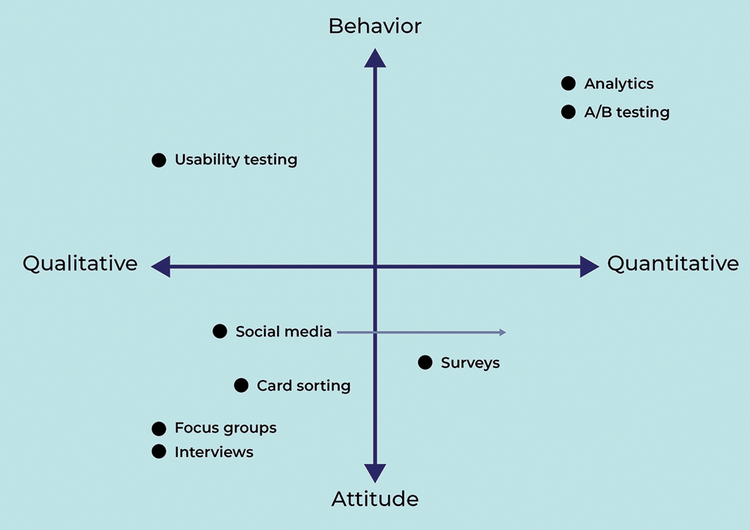
Compare research methods by whether they emphasize qualitative or quantitative evidence and user attitude or behavior. section 4.2


