A radius measures the distance from the origin to a point in space. In a polar coordinate system, it works with an angle to position points around a centered visualization. section 4.4.1
Figure 4.24 The dimensions of a Cartesian coordinate system are perpendicular to one another, while the polar coordinate system uses the radius and angle dimensions to describe a position in space.
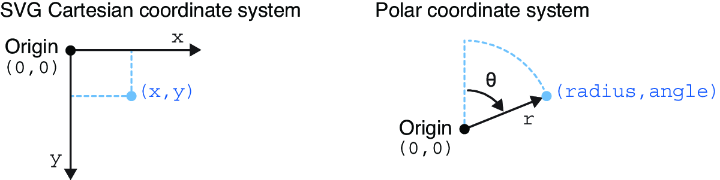
Compare Cartesian coordinates, which use perpendicular x and y dimensions, with polar coordinates, which use radius and angle. section 4.4.1
In arc-based SVG visualizations, radius determines the geometry of the shape:
- Use an inner radius to define the inside boundary of an arc and an outer radius to define its outside boundary. section 4.5
- Position the arc origin at the center of the SVG group so appended arcs are relative to the chart center. section 4.4.1
Centered arc chart
Translate an SVG group to the chart’s center, then configure a D3 arc generator with innerRadius() and outerRadius() to control the arc’s thickness and extent. section 4.4.1 section 4.5



