ReAct (Reason–Act) is a DSPy module for building agents that solve tasks through repeated tool use. Instead of relying on a single response, the language model chooses a tool and its arguments, examines the result, and decides what to do next. section 9.3
Tools are Python functions. The model selects them, but the ReAct module executes them and records their return values as observations. These observations become part of a trajectory that informs subsequent decisions. A tool can retrieve information or change an environment, such as by updating a database or sending an email. section 9.3 section 9.7
A ReAct run has two stages:
- Reason and act iteratively: choose a tool and arguments, execute it, and record the observation. Stop when the model selects finish or the maximum iteration count is reached. section 9.3.1
- Generate the final response from the accumulated observations. The result includes both the signature’s output fields and a trajectory of the steps taken. section 9.3.1
Figure 9.4 In the ReAct cycle, we split the solution of complex problems into iterations. Each iteration starts with a thought step (similar to the thoughts in chain-of-thought), which leads the LM to choose an action. The action is then executed, and its outcome is added to the chat history. This outcome is used in the next ReAct cycle, where the LM determines the next action to take. This continues until either the LM decides it can finish the task or it reaches a maximum number of iterations. In this figure, the LM is responsible for the reason and act steps, while the other steps are initiated by the user or the ReAct module.
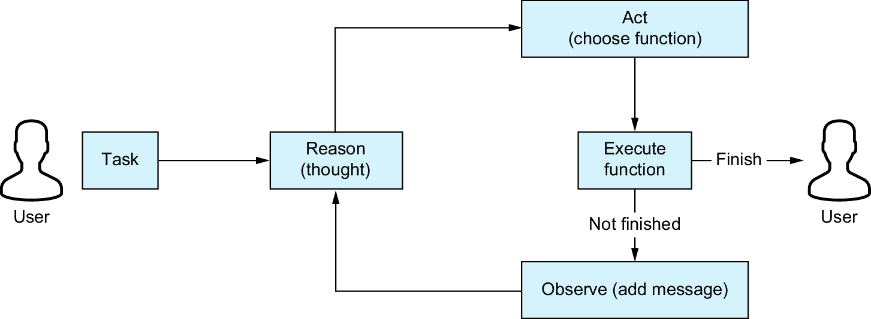
Follow how each observation feeds the next tool-selection step in the ReAct cycle. section 9.3
Calculator agent
Define add, subtract, multiply, and divide as Python tools, then configure dspy.ReAct with the signature "question -> answer: float" and max_iters=4. For “What is (3 + 5) * 2?”, the agent calls add, observes 8.0, calls multiply, observes 16.0, and selects finish. The returned answer is 16.0, and the trajectory records the tool arguments and observations. section 9.3.1
Listing 9.10 Defining a ReAct-based calculator
import dspy

def add(a: float, b: float) -> float:
    """Add two numbers."""
    return a + b

def subtract(a: float, b: float) -> float:
    """Subtract b from a."""
    return a - b

def multiply(a: float, b: float) -> float:
    """Multiply two numbers."""
    return a * b

def divide(a: float, b: float) -> float:
    """Divide a by b."""
    if b == 0:
        raise ValueError("Cannot divide by zero.")
    return a / b

lm = dspy.LM("openai/gpt-4.1-mini", cache=False)
dspy.configure(lm=lm)

react = dspy.ReAct(
    signature="question -> answer: float",
    tools=[add, subtract, multiply, divide],
    max_iters=4,
)

question = "What is (3 + 5) * 2?"
result = react(question=question)

print(f"Answer: {result.answer}")
print("Trajectory:")
for key, value in result.trajectory.items():
    print(f"  {key}: {value}")
See the calculator’s tool definitions, model configuration, ReAct setup, and trajectory inspection. section 9.3.1
ReAct also supports agentic retrieval-augmented generation (RAG). Rather than always retrieving from one fixed source, an agent can select retrieval tools and use earlier results to decide whether to search or read more. A support agent, for example, can retrieve article titles and then read selected articles before answering. This approach can improve accuracy, but usually requires more model calls than a single-step approach; use the simpler approach when it is sufficient. section 9.3.2