A grid organizes values at regularly spaced positions. In geometric work, each cell or sample point gives an algorithm a finite, manageable view of a continuous shape, field, or image. The same layout can store scalar values, such as signed distances or pixel brightness, or coordinate data for a surface. section 8.2.2 section 11.3.2 section 12.4.2
For a parametric surface S(u, v) → (x, y, z), choose sampled u and v values over a UV square. Every pair (uᵢ, vⱼ) produces one 3D point, so the surface model becomes a two-dimensional point grid. A practical representation is three matching 2D arrays: one each for x, y, and z. section 8.2.2
Sampling a mushroom surface
A low-polygon mushroom starts with evenly spaced u and v samples from 0 to 1. One direction becomes an angle around the z-axis; the other follows a polynomial radius profile. Mesh-grid operations repeat the radius values across rows, pair v with angles, and compute x = r cos θ, y = r sin θ, and z = v. The resulting coordinate arrays provide the points later filled with triangles. section 8.2.2
A grid also supplies neighborhoods. In contouring an SDF, compare values in adjacent cells: a sign change between neighbors indicates that the target boundary passes between them. A finer grid generally gives a more accurate model, but increases both the number of cells to process and memory use. The initial cell-edge contour is useful as a scaffold, not a final smooth result. section 11.3.2 section 11.4.1
Grid-based contour construction proceeds in a simple sequence:
- Classify cells from the sign of the SDF at their centers, then place contour segments along edges separating negative and positive neighboring cells. section 11.4.1
- Move segment vertices toward the expected boundary using SDF values as error distances and the inverse gradient as direction. section 11.4.1
- Use endpoint derivatives to turn straight segments into parametric cubic curves when a smoother contour is needed. section 11.4.1
Figure 12.20 An initial contour is a border between pixels with values below the threshold and above.
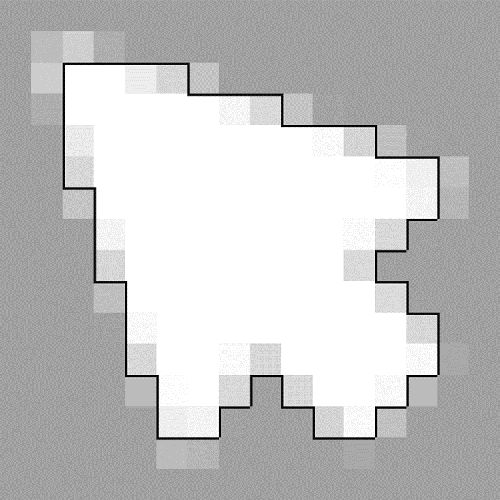
An image is already a grid of color values. Thresholding neighboring pixels creates short border segments wherever their values fall on opposite sides of the light/dark cutoff; this is a usable first contour but remains visibly pixel-based. section 12.4.2







