Replication keeps additional copies of data so a failure does not necessarily take the data or service offline. The copies have different jobs depending on the service: a standby database can take over after a failure, while cache replicas can also serve reads. section 10.5 section 11.6.2
Choose the form of replication that matches the workload:
- For a production relational database, use RDS Multi-AZ. Clients use the primary instance; RDS synchronously replicates data to a standby. If the primary fails, RDS promotes the standby and updates the DNS name. You pay for both instances. section 10.5 section 10.8
- For a read-heavy Redis cache, add replicas to distribute reads. The primary accepts reads and writes; replicas accept reads and synchronize asynchronously, so they eventually reach the primary’s state. section 11.6.2
- For an EC2 instance’s block storage, EBS replicates volume data across multiple disks to protect against hardware failure. The volume remains separate from the instance, but the default root volume is deleted when that instance is terminated. section 8.1
Figure 10.5 The primary database is replicated to the standby database when running in high-availability mode.
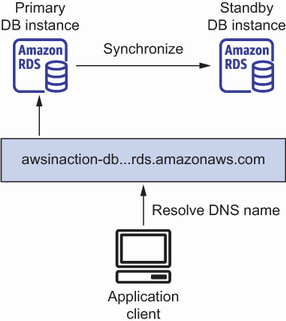
The primary-and-standby diagram shows where RDS keeps the second database copy in a high-availability deployment. section 10.5
A growing Redis cache
Suppose cached data totals 22 GB and each cache node holds 4 GB. Six shards provide 24 GB of capacity; each shard has a primary and can have replicas. Sharding spreads the data, while replication gives a shard additional copies and nodes that can answer reads. Redis cluster mode supports both. section 11.2.4
Replication is not a substitute for a recoverable backup. DynamoDB replicates data across machines and data centers, yet a snapshot is still needed to recover an earlier state after accidental deletion or corruption. Plan for that failure separately from hardware failure. section 12.10