Replication keeps copies of data in different places, but the purpose of those copies matters. A service may need another service’s data, a Kafka cluster may need to survive a broker failure, or an organization may need to recover from a data-center failure. These are different architectural decisions, not one interchangeable replication setting. section 1.5.2 section 2.3 section 11.4.1
In a Kafka architecture, distinguish three uses:
- Data integration: Kafka Connect copies data between Kafka and external systems through configured source and sink connectors, avoiding custom producer and consumer code. section 1.5.2
- Cluster fault tolerance: Kafka replicates each partition across brokers. The topic’s replication factor specifies its number of copies and cannot exceed the broker count. section 2.3 section 5.2.8
- Disaster recovery: Replicas can be distributed across data centers in a stretched cluster, or data can be mirrored asynchronously to a passive cluster. section 11.4.1
Keeping service data in sync
Suppose one service owns customer addresses and another needs updates in its own database. A Kafka Connect source connector can move changes from the first database into Kafka; an independently configured sink connector can write them to the second. The same pattern can feed multiple targets: source connectors can pull from PostgreSQL and MongoDB, while sink connectors consume the resulting topics into MS SQL and Amazon S3. section 1.5.2 section 5.1.2
Figure 5.3 Setting up Kafka Connect for data replication involves using PostgreSQL and MongoDB as source systems. Source connectors are responsible for pulling data from these systems and inserting it into Kafka topics. In turn, sink connectors pull the data from Kafka and insert it into the target systems. In this setup, both sink connectors consume data from the same topics, with one inserting the data into an MS SQL database and the other into Amazon S3.
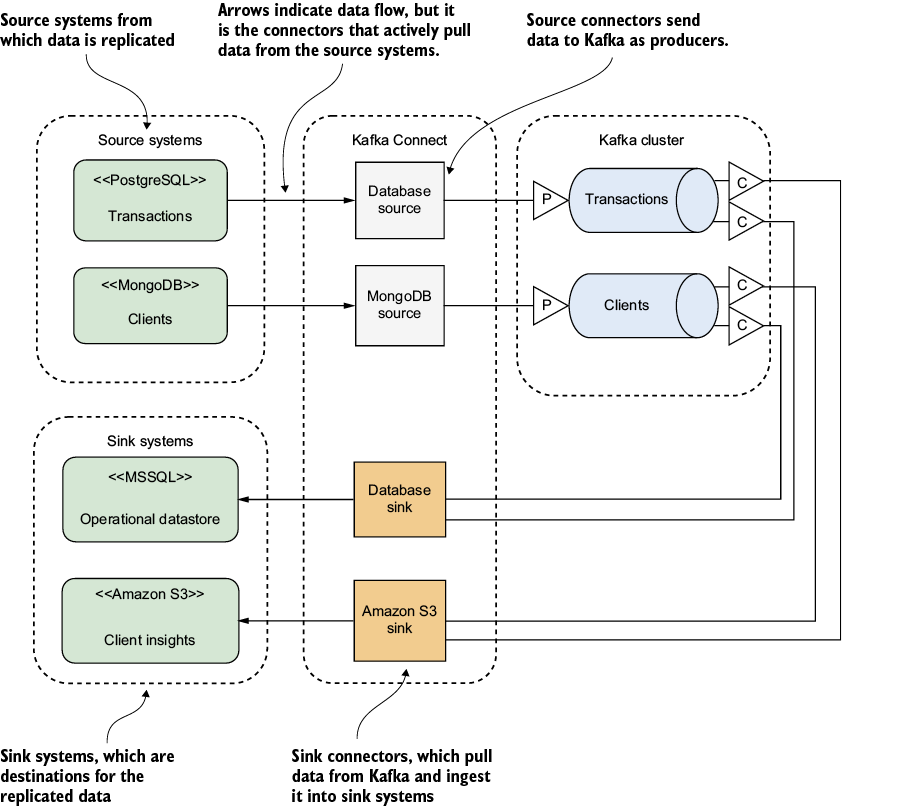
Shows source systems feeding Kafka topics and independent sinks delivering the data to two different targets. section 5.1.2
Choose how the source is read. Kafka Connect can replicate a current-state snapshot, such as through a JDBC source connector, or stream changes from source logs using a CDC tool such as Debezium. Connect requires a running cluster, suitable plugins, and connector settings for connections, tables, and polling where applicable. Direct Kafka applications and database synchronization tools are alternatives; Kafka is not required for every transfer. section 5.1.2
Moving fields between systems also couples their schemas. A source schema change can stop a connector when records no longer match Kafka’s expected schema; an incompatible target record may instead go to a dead-letter topic. Monitor both cases and plan how to reconcile or reload missed data. Replication also is not a substitute for a tested backup and restore process: erroneous writes, deletion, or shortened retention can still cause irrecoverable loss. section 7.3.10 section 11.1.4
For availability, place partition copies on separate brokers; open source Kafka defaults to a replication factor of one, so high availability requires changing that setting. For disaster recovery, weigh recovery time and potential data loss: a stretched cluster adds cross-site latency requirements, while asynchronous active-passive mirroring can lose recent data and takes time to switch clients over. section 2.3 section 11.4.1