A role is a named collection of permissions assigned to a user or service account. Grouping permissions into roles makes access composable: teams can add or remove a defined access set as infrastructure changes. section 8.1.1
Use roles to enforce least privilege by granting only the access required for a task. A delivery pipeline might manage network, application, and database resources without receiving broader administrative access. section 8.1.1
Extract project-level roles from a monolithic infrastructure configuration without disrupting live access:
- Copy the IAM configuration into a separate directory or repository. section 10.2.1
- Initialize the new infrastructure state and import the existing roles and service accounts rather than recreating them. section 10.2.1
- Run a plan or dry run and verify that the separated configuration produces no changes. section 10.2.1
- Remove the role configuration from the monolith’s state and code only after the separated configuration matches live infrastructure. section 10.2.1
Frontend pipeline roles
A frontend delivery pipeline receives roles/compute.networkAdmin, roles/appengine.appAdmin, and roles/cloudsql.admin. These permissions allow network, application, and database administration while excluding unrelated resource types. section 8.1.1
Figure 10.5 The sundew system’s IAM policies for the GCP project have no dependencies, and you can easily refactor them without disrupting other infrastructure.
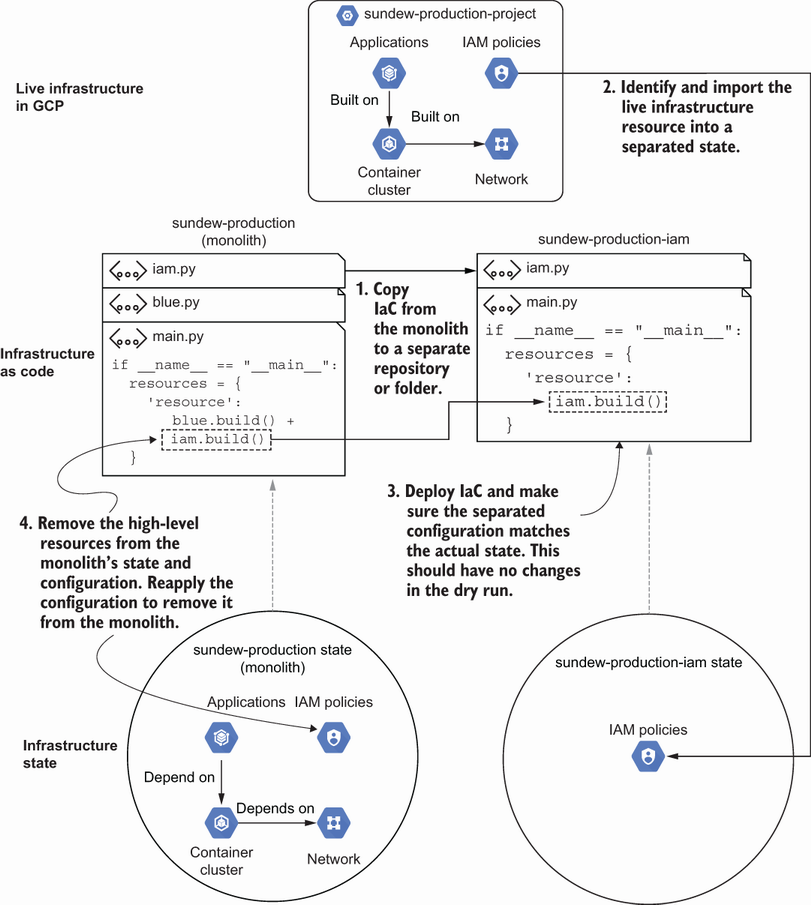
Shows why IAM policies with no resource dependencies can be separated first during infrastructure refactoring. section 10.2.1










