A role groups capabilities so an application can decide what a user may do after logging in. Authentication identifies the user; authorization uses the user’s role to control access to actions and routes. section 9.6 section 9.9
A practical role scheme separates ordinary content work from system-wide administration:
- Administrator: updates, activates, or deactivates any content and can activate or deactivate users. section 9.6
- Editor: updates any content, including content created by other users, but cannot deactivate users or their content. section 9.6
- Registered user: creates content and manages its active state, but cannot change another user’s or another user’s content state. section 9.6
Roles are initialized by the application and maintained as database records. Each user has one role, while many users can share the same role, forming a one-to-many relationship between roles and users. section 9.6.1
Named permissions backed by stored values
A Role model defines a Permissions Flag enum with REGISTERED, EDITOR, and ADMINISTRATOR names. The application stores the underlying integer in raw_permissions, initializes the role table at startup, and exposes the permissions class to templates for upcoming authorization features. section 9.6.1
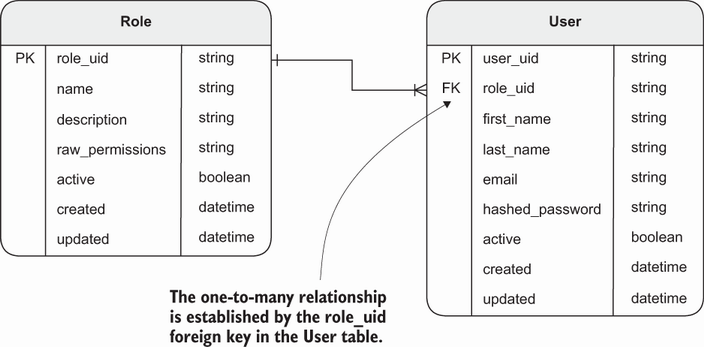
The relationship diagram clarifies how the role lookup table connects to users and supports shared roles. section 9.6.1










