A newly deployed model can give incorrect or inconsistent answers while uptime, latency, and error dashboards remain green. Rollback restores an earlier version to limit the impact while the failure is investigated. It is the operational response to problems that monitoring or user reports reveal, including safety regressions and failures missed by evaluation. section 9.1 section 9.3
Rollback must be prepared before a promotion. Keep the previous two versions ready for instant serving, and retain old checkpoints until at least two newer versions have been validated in production. Two spare checkpoints for a full 4B model cost about 16 GB of disk; without them, recovery may require rebuilding the path back during an incident. section 9.3.1
A practical rollback playbook has four parts:
- Detect degradation through monitoring or reports; infrastructure health alone may not reveal incorrect model behavior. section 9.3 section 9.1
- Decide whether to revert when the new version causes a significant regression, including a safety failure. section 9.3 section 9.9.2
- Execute the revert using a registry that identifies the active and prior versions and their checkpoint paths. section 9.1 section 9.9.2
- Verify recovery, targeting less than one hour from detection to verified rollback. Practice first in a non-production registry, then quarterly against the real serving stack. section 9.3.1
Figure 9.4 Rollback timeline: detection, decision, execution, and verification inside one hour.
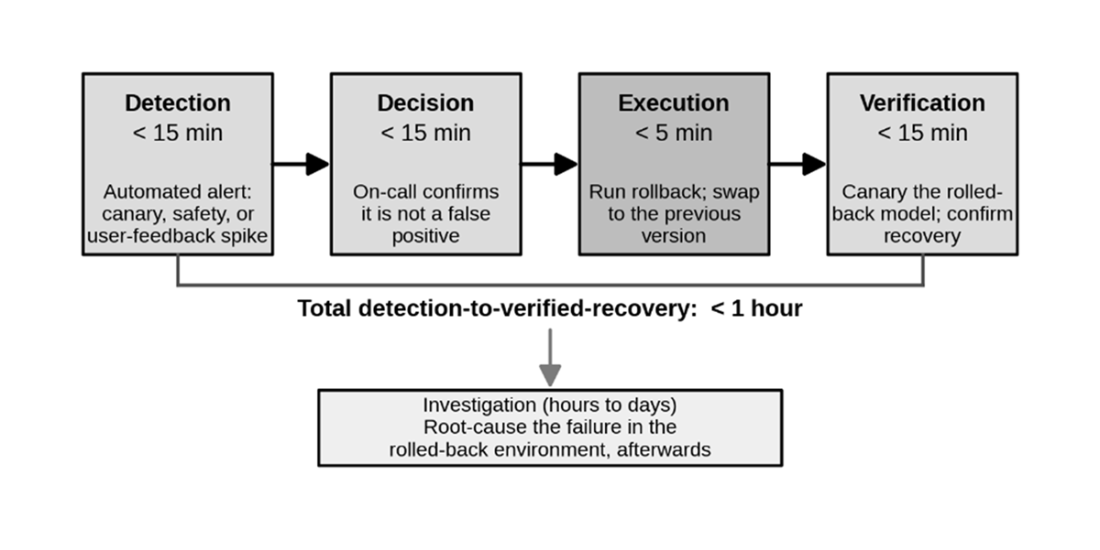
The timeline organizes detection, decision, execution, and verification around the one-hour recovery target. section 9.3.1
Safety regression after retraining
In an illustrative help-desk deployment, a monthly safety run flags a bias-fairness pass rate of 0.50 against a 1.00 threshold. A registry rollback restores v1 and retires v2, with verified recovery in under an hour. The team removes biased training examples, retrains as v3, and runs the full safety suite before promotion; the failed v2 remains in the registry for audit. section 9.9.2 section 9.0
A registry also supports the investigation after recovery: version tags, training technique, base model, data hash, checkpoint path, and evaluation metrics provide an audit trail. Rollback is not a substitute for validating the corrected model before its next deployment. section 9.11 section 9.6.1