Imagine several people waiting to use one workbench. A scheduler decides who gets it next. In a multitasking system, the workbench is processing time: the scheduler selects a task that is ready to run and gives it a turn. One processor core still executes one stream of instructions at a time; rapid switching can make several tasks appear to run together. section 6.13 section 6.11
That choice matters when there are more ready tasks than processors. A scheduler may aim for throughput, fairness, or quick responses, but these goals can conflict. It may also run another task while one waits for I/O. Switching is not free, though: too much context switching can waste time, particularly when tasks are CPU-bound. section 6.13 section 10.10 section 6.14
How a task gives up its turn depends on the scheduling approach:
- With preemptive multitasking, a time slice can expire and the scheduler can interrupt the task so another runs. section 6.7
- With cooperative multitasking, a task hands control back itself. If it does not yield, the scheduler cannot take its turn away. section 12.3
Do not depend on a particular task running next: scheduling choices are not guaranteed to repeat. Coordinate tasks explicitly when their order matters. section 6.13
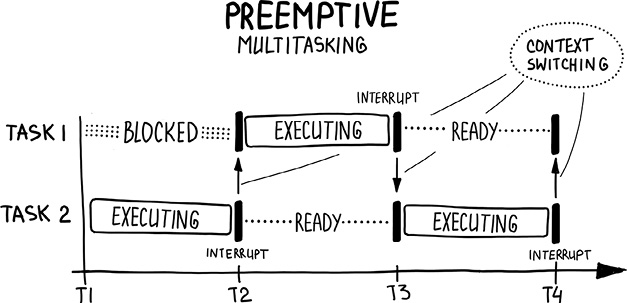
A timeline of three tasks shows how short, alternating turns create the appearance of simultaneous progress. section 6.7
A scheduler for word counting
A central scheduler gives idle workers files to map, tracks completed work, then starts the reduce phase after mapping finishes. Assigning another file when a worker becomes free helps when file counts and sizes are not known in advance. Its Python implementation uses start, mapping, reducing, and finished states. section 13.13 section 13.14
# Chapter 13/wordcount/scheduler.py
import asyncio
from enum import Enum
import typing as T

from protocol import FileWithId

class State(Enum):
    START = 0
    MAPPING = 1
    REDUCING = 2
    FINISHED = 3

class Scheduler:
    def __init__(self, file_locations: T.List[str]) -> None:
        self.state = State.START
        self.data_len = len(file_locations)
        self.file_locations: T.Iterator = iter(enumerate(file_locations))
        self.working_maps: T.Dict[str, str] = {}
        self.map_results: T.Dict[str, str] = {}

    def get_next_task(self) -> T.Tuple[bytes, T.Any]:
        if self.state == State.START:
            print("STARTED")
            self.state = State.MAPPING

        if self.state == State.MAPPING:
            try:                                                            #1
                map_item = next(self.file_locations)                        #1
                self.working_maps[map_item[0]] = map_item[1]                #1
                return b"map", map_item                                     #1
            except StopIteration:                                           #1
                if len(self.working_maps) > 0:                              #1
                    return b"disconnect", None                              #1
                self.state = State.REDUCING                                 #1

        if self.state == State.REDUCING:
            return b"reduce", self.map_results

        if self.state == State.FINISHED:
            print("FINISHED.")
            asyncio.get_running_loop().stop()
            return b"disconnect", None

    def map_done(self, data: FileWithId) -> None:                           #2
        if not data[0] in self.working_maps:                                #2
            return                                                          #2
        self.map_results[data[0]] = data[1]                                 #2
        del self.working_maps[data[0]]                                      #2
        print(f"MAPPING {len(self.map_results)}/{self.data_len}")           #2

    def reduce_done(self) -> None:                                          #3
        print("REDUCING 1/1")                                               #3
        self.state = State.FINISHED                                         #3
The Python Scheduler listing shows its states and the method that supplies the next task. section 13.14











