liveBook · Manning

Scheduling

As explained in Acing the Certified Kubernetes Administrator Exam, Second Edition

The process of deploying applications to Kubernetes by assigning their pods to suitable execution resources.

Scheduling deploys applications by assigning pods to suitable nodes. The scheduler selects a node and verifies that sufficient resources are available; Deployments and ReplicaSets maintain workload replicas. section 1.4.2 section 2.1.2

Use these mechanisms to control pod placement:

  • Apply node labels and select them with nodeSelector or label selectors. section 4.1 section 4.3
  • Use nodeName for direct placement or node affinity for required rules and preferred placement. section 4.3
  • Use pod affinity to colocate pods within a node or topology domain such as a zone or rack. section 4.3
  • Declare CPU and memory requests and limits so pods reserve and constrain resource usage. section 4.3

Schedule a pod onto an SSD node

Inspect labels with `kubectl get no --show-labels`, label the worker using `kubectl label no kind-worker disktype=ssd`, and add `nodeSelector: {disktype: ssd}` to the pod YAML. Apply it, then verify placement with `kubectl get po -o wide`; the pod should show `kind-worker` in the NODE column. section 4.1

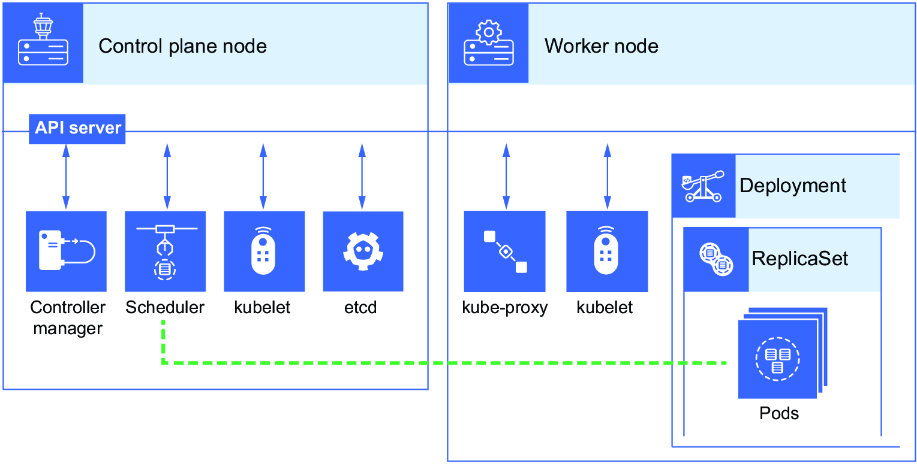
Figure 4.1 The scheduler schedules the pods to run on the worker node after verifying resource availability.
figure

Visualizes the scheduler verifying node resources before assigning pods to a worker node. section 4.1


How Acing the Certified Kubernetes Administrator Exam, Second Edition covers it

How deep it goes
Defines scheduler assignment and resource checks, then works through labels and selectors; it stops short of deeper scheduler internals.
Examples
Demonstrates labeling kind-worker as disktype=ssd, selecting it in pod YAML, and verifying the running pod with kubectl output.
What it assumes
Assumes basic Kubernetes resources and kubectl usage while building scheduling knowledge from pod-to-node assignment and label inspection.
What you can do after
Operate/configure pod placement by labeling nodes, editing YAML selectors, applying workloads, and verifying their assigned nodes.
How it connects
Connects the scheduler with pods, nodes, Deployments, node labels, node selectors, node affinity, pod affinity, and resource requests and limits.

Also explained in

Compare how 5 books explain scheduling →

Related concepts

This explainer was generated by Manning's knowledge graph from the text of Acing the Certified Kubernetes Administrator Exam, Second Edition. The section links point to the parts of the book it draws on.


