A timeline arranges events or measurements along an ordered temporal dimension. Build one by identifying data attributes, classifying them as quantitative or qualitative, and choosing visual encodings that match each attribute. section 14.2
A timeline can combine several encodings:
- Position events along time to show when they occurred. section 14.2
- Use circle color for categories, size for dimensions, and borders for media. section 14.2
- Add bars or an area chart to show counts over the same period. section 14.2
- Add brushing so users can select a one-dimensional time range and filter related data. section 13.4
A timeline for artistic production
Place each painting on a timeline of an artist’s career. Encode its subject with color, dimensions with circle size, and medium with the border. Add monthly drawing and letter counts as bars or an area chart, then let users select periods interactively. section 14.2
Figure 14.4 After exploring the data attributes and establishing their types, we decided to represent each painting with a circle positioned over a timeline. The circle’s color, size, and border will communicate the painting’s subject, dimensions, and medium. We’ll visualize the number of drawings and letters via the length of bars and an area chart, also positioned over a timeline.
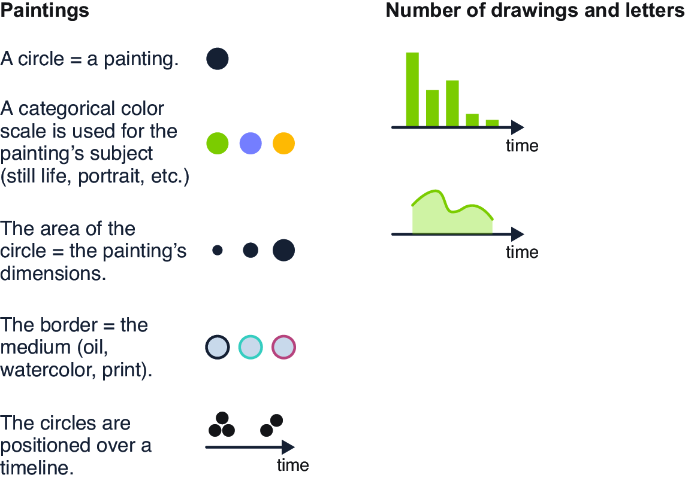
Use this visual plan to connect data types with timeline positions, circle encodings, bars, and area charts before implementation. section 14.2
Listing 13.17 Adding the brushing functionality (map-world.js)
...
import { brushX } from "d3-brush";

export const drawWorldMap = (laureates, world) => {

  ...

  const handleBrush = (e) => {   #1
    console.log(e);
  };


  const brushHandler = brushX()   #2
    .extent([[0, 0], [tlInnerWidth, tlHeight]])   #3
    .on("brush", handleBrush);   #4

  yearsSelector          #5
    .call(brushHandler)
    .call(brushHandler.move, [xScale(minYear),    #6
      xScale(maxYear)]);

};
Use this implementation pattern to create a D3 one-dimensional brush, define its extent, listen for brush events, and initialize the selected range. section 13.4




