When a database password changes, an application holding only the old password may fail its next query. Credential rotation avoids turning that change into an outage by letting the application refresh its secret and retry. section 11.5.3
When a database rejects an expired credential, the application can:
- Catch the unauthorized or login-failed error. section 11.5.3
- Clear the old credential from its local cache. section 11.5.3
- Fetch the fresh secret from the Secrets Manager. section 11.5.3
- Retry the original operation using the new credential. section 11.5.3
A midnight password change
If a database password changes while an application is running, an application that only fetched it at startup may fail. A design that catches the authentication error, fetches the rotated password, and retries can keep the failure from becoming a user-visible outage. AWS Secrets Manager can generate a new database password every 30 days. section 11.5.3
Manual retry logic around every query is tedious and error-prone. Spring Boot applications can pair connection pools such as HikariCP with dynamic configuration tools or Secrets Manager integrations to automate recovery. Another pattern fetches credentials at startup or after an unauthorized response. section 11.5.3 section 11.5.2
Figure 11.7 Mature architectures "catch" authentication failures and swap in fresh secrets without stopping the application.
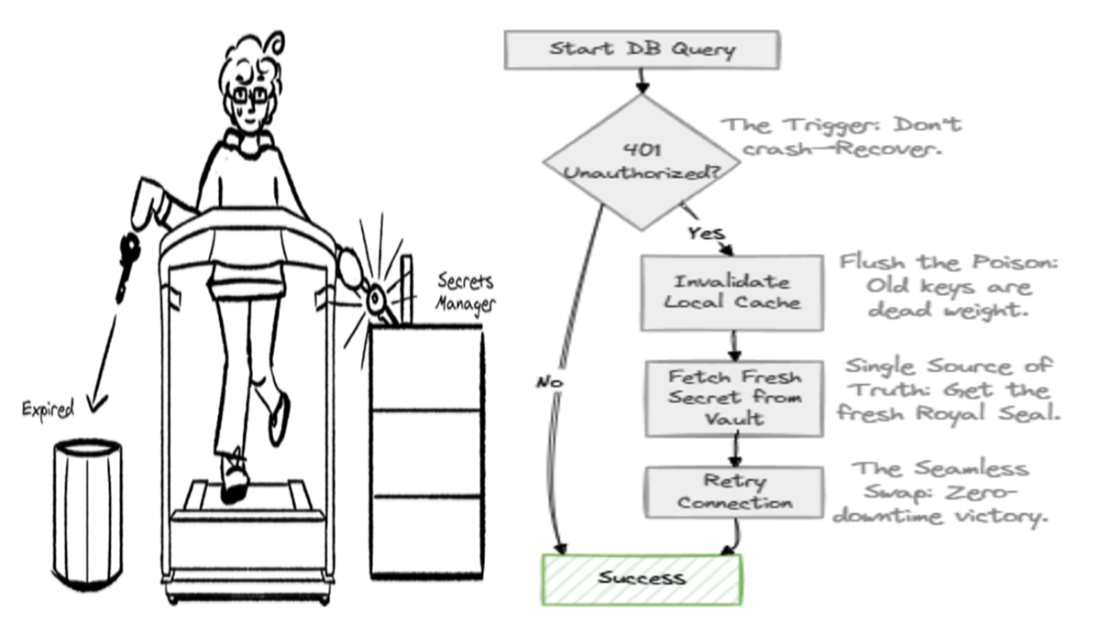
See the recovery cycle: catch an authentication failure, replace the stale secret, and continue without stopping the application. section 11.5.3 section 11.10