Syslog severity classifies event importance numerically and determines which messages are logged or transmitted to each destination. Lower values indicate greater urgency. section 7.2 section 7.2.2
Figure 7.4 The eight Syslog severity levels. Lower levels are more severe.
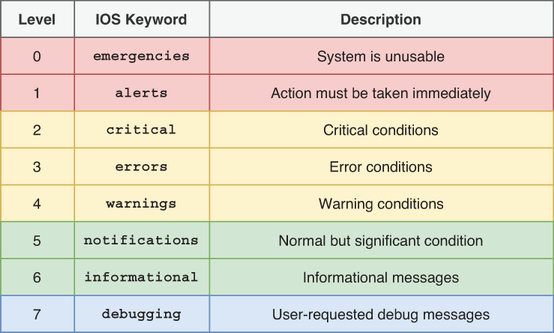
Use the severity-level figure to review the eight Cisco IOS levels and their descending urgency. section 7.2.2
Cisco IOS defines these eight levels:
- 0 — emergencies: system crashes and similarly immediate failures. section 7.2.2
- 1 — alerts: particularly serious events requiring immediate attention. section 7.2.2
- 2 — critical, 3 — errors, and 4 — warnings: conditions that should be addressed; an unexpected interface shutdown is level 3. section 7.2.2
- 5 — notifications and 6 — informational messages: routine status or minor changes, such as successful login or manual shutdown. section 7.2.2
- 7 — debugging: detailed events generated by the debug command. section 7.2.2 section 7.2.3
Configure a destination with a severity threshold: logging console [severity], logging monitor [severity], logging buffered [bytes] [severity], or logging trap [severity]. Messages at the selected severity and more severe levels are retained or sent. Console, monitor, and buffer logging default to debugging; trap logging defaults to informational. section 7.2.2
Operational example
The message %LINK-3-UPDOWN identifies LINK as the facility, 3 as the severity, and UPDOWN as the mnemonic; its description reports the interface state change. A level-7 debug message requires debugging severity to be enabled and can consume significant CPU on a live device. section 7.2 section 7.2.3






