Alert severity classifies Microsoft Defender for Cloud alerts by investigation priority. The Security alerts dashboard uses severity to help decide what to investigate first: high alerts indicate high confidence of compromise, medium alerts indicate suspicious activity, low alerts can be benign positives or blocked attacks, and informational alerts may matter when considered with an incident’s other alerts. section 7.3.1
Use the severity levels as an initial triage signal:
- High: investigate with the highest priority, such as when a known credential-theft tool is detected. section 7.3.1
- Medium: assess suspicious activity that might indicate compromise, such as a sign-in from an unusual location. section 7.3.1
- Low: review in context; it can represent a benign positive or blocked attack, including routine log clearing. section 7.3.1
- Informational: consider alongside related alerts in a security incident before deciding whether further investigation is warranted. section 7.3.1
Severity is a prioritization aid, not the only signal. Where available, MITRE ATT&CK mappings identify associated tactics and techniques, helping clarify adversary intent and refine the investigation order. section 7.3.1
Route medium-or-higher alerts
Configure email notifications for the relevant subscription so Contributor-role recipients and specified addresses receive alerts at Medium severity or higher. The portal also supports High and Low thresholds; use the threshold that matches the team’s response capacity. section 7.2.9
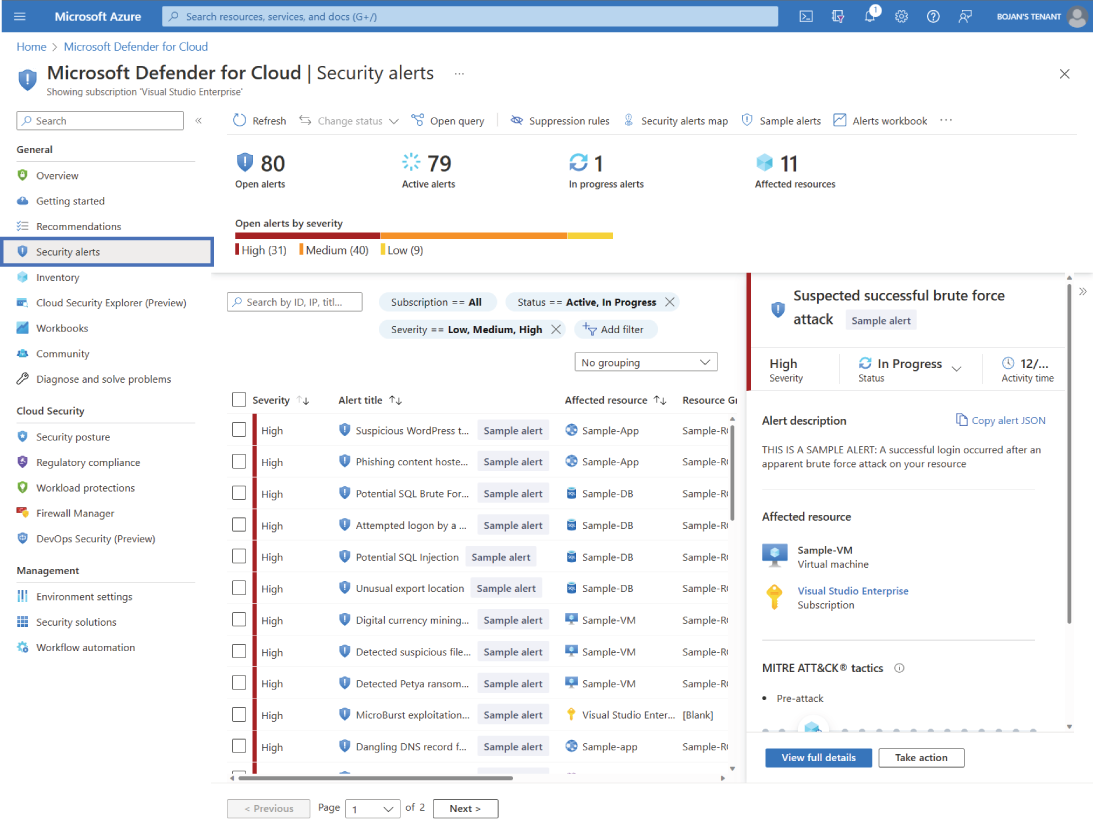
Use the Security alerts dashboard to view alerts and begin triage according to their default severity-based priority. section 7.3.1






