liveBook · Manning

Sidebar

As explained in Build Python Web Apps with Streamlit

A sidebar is a user-interface panel positioned beside the main content area for navigation or auxiliary controls.

A sidebar is a panel beside the main content area. In a Streamlit app, it holds navigation, app information, or controls such as quantity choices while the main area handles the primary task. section 3.6.1

Use a sidebar when the interface needs to:

  • Offer links to different app pages. section 3.6.1
  • Provide metainformation or additional content without crowding the main area. section 3.6.1
  • Keep controls such as radio buttons separate from the primary workflow. section 3.6.1

Unit Converter quantity selector

Place the quantity choices in the sidebar with either `with st.sidebar:` or dot notation: `quantity = st.sidebar.radio("Select a quantity", ["Mass", "Length", "Time"])`. Streamlit displays an X icon to collapse the panel and a > icon to reopen it. section 3.6.1

Figure 3.8 st.sidebar in action with a set of radio buttons inside
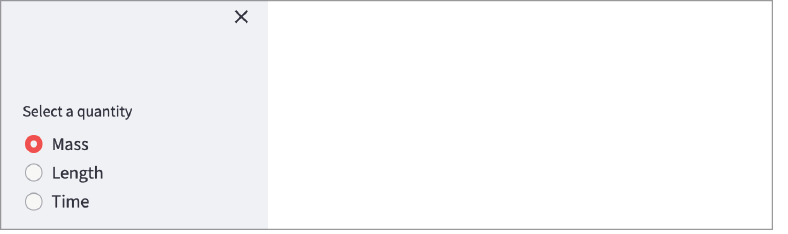
Inspect the rendered sidebar with radio buttons in the Unit Converter interface. section 3.6.1


How Build Python Web Apps with Streamlit covers it

How deep it goes
Implements sidebar content with context-manager and dot-notation forms, and demonstrates collapse behavior without detailing backend integration.
Examples
Uses a Unit Converter's Mass, Length, and Time radio-button selector as the concrete sidebar example.
What it assumes
Assumes basic Python with-statements and Streamlit elements while demonstrating sidebar placement through a working widget example.
What you can do after
Build it from scratch by placing Streamlit widgets in a collapsible sidebar with either supported syntax.
How it connects
Connects Streamlit sidebars with radio buttons, select boxes, columns, frontend layout, and backend-driven options.

Also explained in

Compare how 2 books explain sidebar →

Related concepts

This explainer was generated by Manning's knowledge graph from the text of Build Python Web Apps with Streamlit. The section links point to the parts of the book it draws on.