A simulator is software that implements a simulation: a computational model that reproduces relevant behavior of a real system. In robotics, it substitutes for both the environment and robot hardware, supplying virtual sensor data, accepting actuator commands, and advancing the virtual world. Robot software can therefore use the same sensor and actuator interfaces against a virtual robot or a real one. section 5.1 section 5.6
Figure 5.1 A robotics simulator replaces the real world with a virtual environment by providing virtual sensor data to the virtual robot, receiving virtual actuator commands from the robot software, and computing the time evolution of the virtual world according to a physics engine.
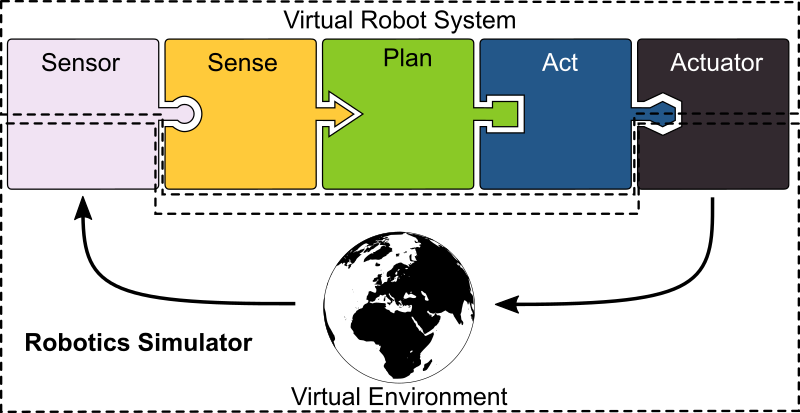
The control loop stays recognizable: robot software reads virtual sensors, sends virtual actuator commands, and the simulator evolves the world through physics. section 5.1
A simulator combines a scene graph that tracks entities and their relationships with robot and object models. Robot models specify joints and links, including geometry, inertia, friction, limits, collision properties, sensors, and actuators. A physics engine handles kinematics and dynamics; rendering and audio support visualization; and a GUI and API support interactive and programmatic use. section 5.1 section 5.6
Simulation supports work across a robot development lifecycle:
- Prototype and develop robot behavior before using physical hardware. section 5.6
- Run concurrent engineering, benchmarking, reinforcement learning, and automated testing in a virtual world. section 5.6
- Keep ROS-based software runnable on a virtual robot and the corresponding real robot. section 5.6
Gazebo warehouse robot
Gazebo can run a TurtleBot 4 in a virtual warehouse with SLAM, navigation, and RViz enabled. Gazebo’s GUI shows the simulated world’s actual, ground-truth state, while RViz shows the robot’s estimated state from virtual sensor observations, including depth-camera point clouds. Gazebo uses SDF for worlds and objects; URDF robot descriptions can be extended with simulated sensors and actuators. section 5.1 section 5.6
Figure 5.5 The Gazebo GUI (left) displays the actual state, or ground truth, of the simulated world, including complete boxes on shelves, while RViz (right) visualizes the robot’s incomplete estimated state based solely on what its virtual RGBD camera observes.
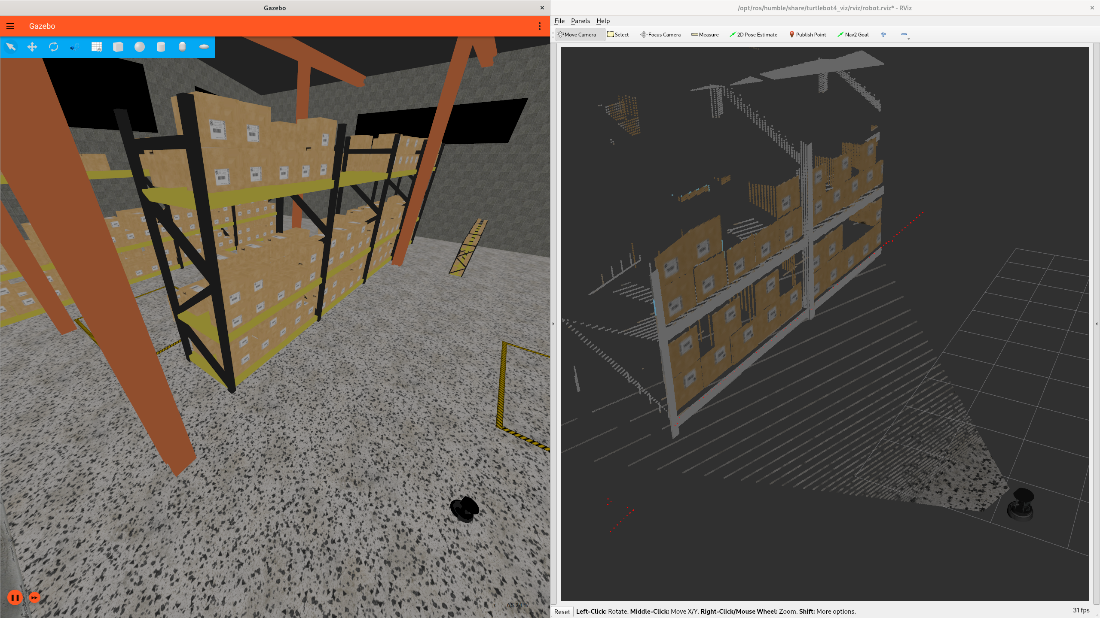
Compare complete simulator ground truth with the partial estimated world available to robot software through its virtual RGBD camera. section 5.1
Simulation is not identical to deployment. Compute performance, memory, and network resources may differ between a development PC and embedded robot hardware. The sim-to-real gap also reflects modeling limits: physics engines may treat bodies as rigid and contacts as points, while rendering quality depends on the rendering engine and model fidelity. Co-simulation can combine models, and FMUs provide a standard exchange format for models of critical components such as electrical motors. section 5.1 section 5.6