A single-page application (SPA) renders pages in the browser: the backend can provide dynamic data as JSON while client-side code updates the displayed interface during navigation. This avoids replacing and repainting an entire page, producing application-like interactions and immediate feedback. section 9.1.1
Angular applications are single-page by default. An initial request delivers sparse HTML containing the root component and script references; the browser then downloads and executes JavaScript before rendering the requested content. This can worsen Largest Contentful Paint and time to interactive, particularly for mobile-heavy or marketing-facing sites. section 9.1.2
SPAs separate responsibilities and change deployment requirements:
- Serve bundled JavaScript, HTML, and CSS from static hosting or a CDN, keeping server delivery separate from client rendering. section 9.1.1 section 9.4.4
- Configure the host to return index.html for unknown routes. Otherwise, a direct request such as /products can make the server seek a nonexistent products.html file and return 404. section 9.4.4
- Consider server-side rendering when initial-load costs make a browser-only render unsuitable; an SSR setup retains a normal browser bootstrap alongside server-specific bootstrap and configuration. section 9.1.2 section 9.2.1
Angular SPA entry document
An Angular SPA can begin with an index.html document containing an <app-root> element and runtime, polyfills, vendor, and main scripts. The application content appears only after those scripts run. section 9.1.2
Figure 9.3 Life cycle of the relation between a SPA and server/CDN
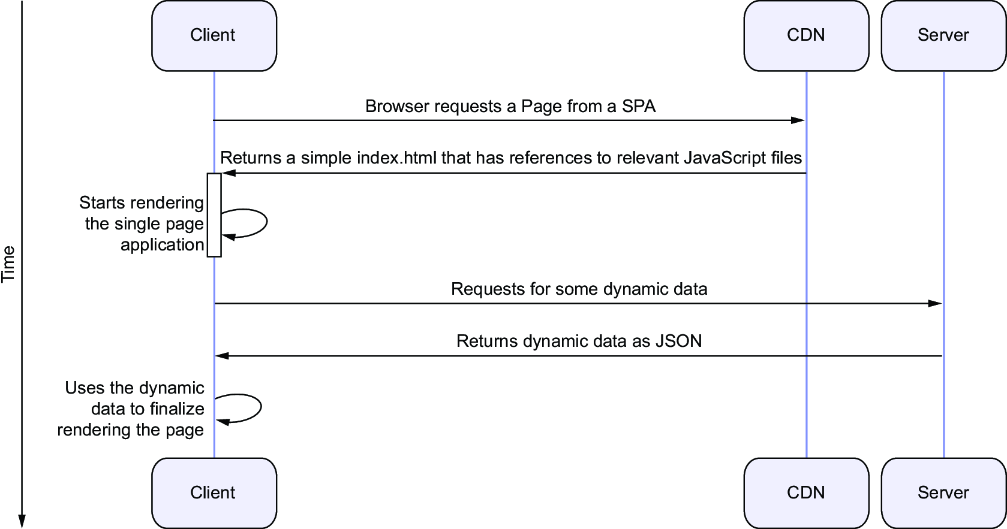
Trace the SPA relationship with a server or CDN and the additional browser-side rendering steps. section 9.1.1




