A single-page application (SPA) loads an entry document, then handles navigation in client-side code. A custom router selects views, and client-side code renders subsequent sections and data, optionally requesting data or partial code over HTTP. Moving between views does not require a new browser navigation that reloads the page context. section 2.1.4
Choose this navigation model for the application’s requirements, not as a default. A multi-page application serves different sections at different URLs through browser navigation. The approaches can coexist: a site can serve static sections as multiple pages while using an SPA for one part. section 2.1.4
Opening a route directly
Opening /products/42 sends an HTTP request to the server before the client router runs. For a route owned by an SPA shell, the server returns the entry HTML; once it loads, the router reads the URL and renders the matching view. Without that server behavior, client-side routing alone cannot handle the direct request. section 10.2
Configure the server fallback deliberately:
- Return the SPA entry document for routes the client renders, but serve real files and API endpoints normally. section 10.2
- Return a real 404 for routes that should not exist; do not hide them behind an empty shell. section 10.2
- If deployed under a subpath, account for that prefix in both the server rewrite and client router. section 10.2
Figure 10.2 A link in a shell-based SPA starts on the server, the server delivers the shell (index html) and then the client router in JavaScript is responsible for rendering the view based on the URL.
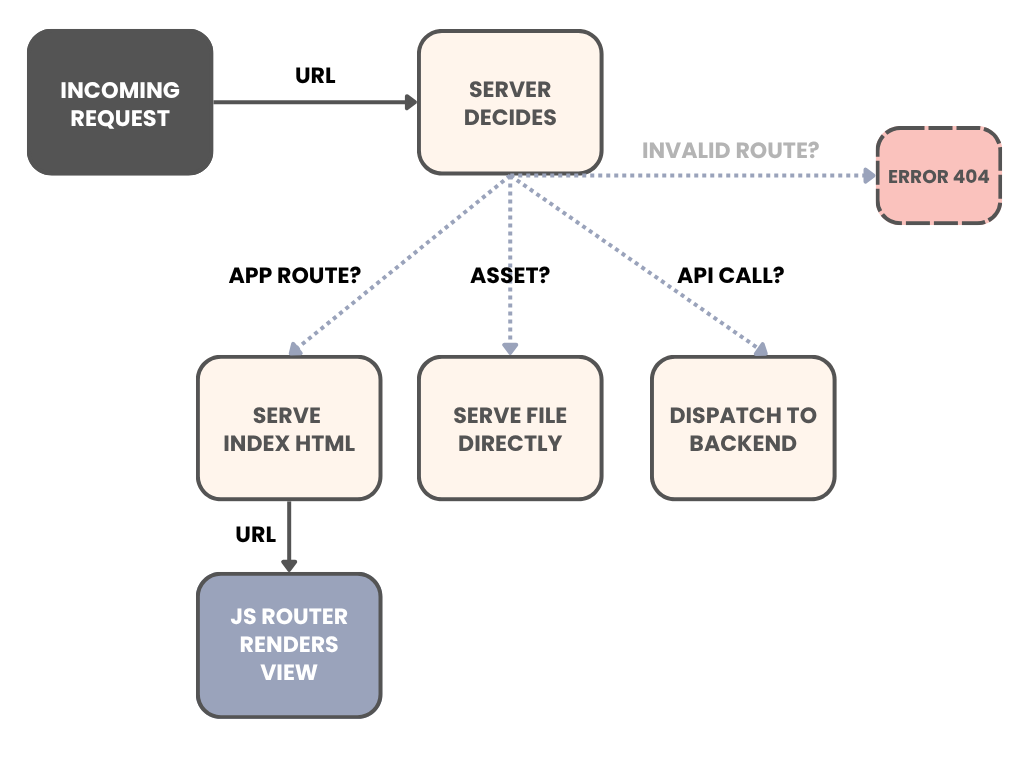
The request sequence shows why the server must deliver the shell before client-side routing can render a linked view. section 10.2
A pure SPA is not the only way to provide usable URLs. Server-side rendering returns route-specific HTML on request; static site generation produces it ahead of time. For public content where discoverability matters, those approaches or prerendering may be a better fit. section 10.2