Single sign-on (SSO) lets a user authenticate once with a trusted identity provider (IdP), then access multiple applications without signing in again. This reduces the burden of managing separate credentials. The IdP issues a security token, which each application checks before deciding what the user may access. section 10.3.2
A typical SSO flow works like this:
- The user signs in with the IdP, usually using multi-factor authentication. section 10.3.2
- The IdP issues a token, such as a SAML assertion or OpenID Connect token. section 10.3.2
- A relying party (RP), also called a service provider (SP), validates the token and applies its own authorization rules. A valid token authenticates the user but does not, by itself, determine their access level. section 10.3.2
One sign-in, several workplace apps
An employee signs in once, then opens email, a ticketing system, an internal wiki, and document systems without reentering credentials. Think of the IdP as a theme-park entrance that checks your ID and gives you a wristband; each application is a ride that scans it. The ride still decides who can enter. section 10.3.2
SSO commonly connects applications that rely on the same identity authority. Federated identity management extends the trust relationship across independent organizations or administrative domains, while each domain keeps control of its own policies. section 10.3.3
Figure 10.2 Illustration of single sign-on (SSO) from a central Identity Provider
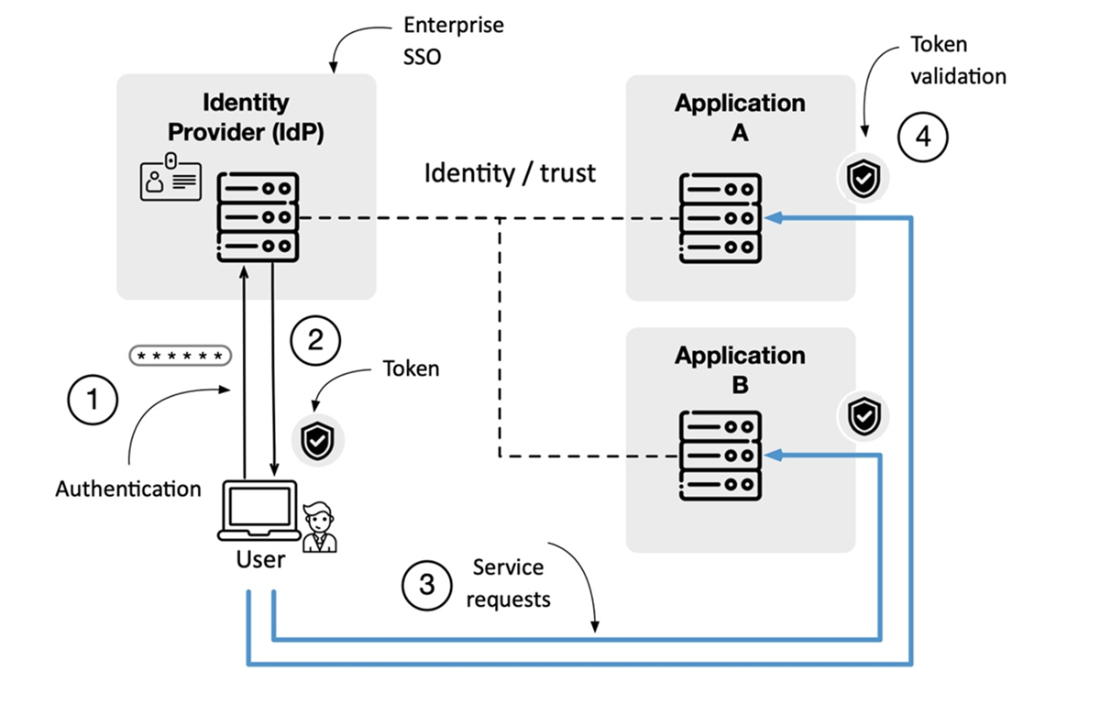
Use the central identity-provider diagram to follow how one sign-in supports access to multiple applications. section 10.3.2