An SNMP manager is the SNMP component on a network management system (NMS) that communicates with SNMP agents on managed devices. It sends Get and Set requests, receives responses, and accepts notifications such as Traps. section 6.1.2 section 6.4
Use the message direction and UDP ports to distinguish the manager from the agent:
- Sends Get requests to read MIB variables and Set requests to modify them or initiate actions such as reboots. section 6.1.2 section 6.4
- Receives Response and Trap messages from agents on managed devices. section 6.1.2
- Listens on UDP port 162, while the agent listens for manager requests on UDP port 161. section 6.1.2
- Uses an SNMP application, often with a GUI, to let an administrator monitor and manage devices. section 6.1.2
Community-based access
With SNMPv1 or SNMPv2c, a manager supplies a community string. A read-only string permits Get, GetNext, and GetBulk requests but rejects Set; a read-write string permits both reading and writing. ACLs can restrict which managers may use each community. section 6.3.1
Figure 6.4 The components of the NMS’s and managed devices’ SNMP entities. The NMS’s SNMP entity consists of the SNMP manager and SNMP application(s). The managed devices’ SNMP entities consist of the SNMP agent and the MIB.
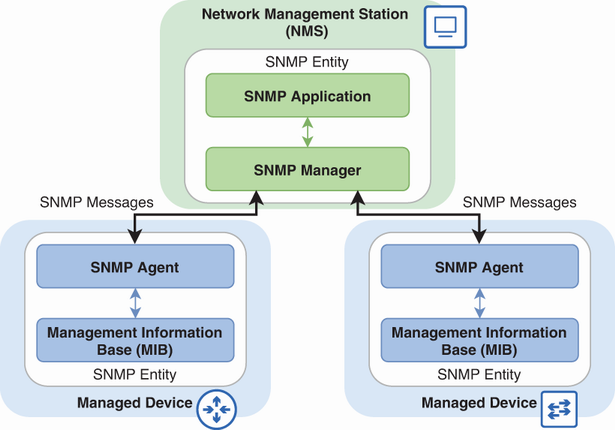
Use the component diagram to distinguish the NMS entity, containing the SNMP manager and application, from each managed device entity, containing the agent and MIB. section 6.1.2
