In MongoDB, sort orders query results by one or more document fields. Use it to present results in a meaningful order; combine it with skip and limit when navigating large result sets. section 4.10.1 section 4.10
Order routes by stops
Run db.routes.find().sort({ stops: -1 }) to list routes by number of stops in descending order. Use 1 instead of -1 for ascending order. section 4.10.1
For multi-field sorts, align the query with a compound index:
- Create db.movies.createIndex({ runtime: 1, year: 1 }), then run db.movies.find().sort({ runtime: 1, year: 1 }). The sort orders first by runtime, then by year. section 7.6.7
- Keep sort fields in index order. An index on { a: 1, b: 1 } supports sorting by { a: 1, b: 1 }, but not by { b: 1, a: 1 }. section 7.6.7
Filter and sort movies
After creating the runtime-and-year index, run db.movies.find({ runtime: { $gt: 40 } }).sort({ runtime: 1, year: 1 }) to filter by runtime and order the matching movies by both fields. section 7.6.7
Figure 7.3 The explain plan for a query optimized with an index using the ESR rule in Compass. The plan contains an IXSCAN stage, which uses the year_1_title_1_imdb.rating_1 index to scan and fetch documents. This stage returned two documents and examined four index keys with an execution time of 0 ms. Then the FETCH stage retrieves the documents with an execution time of 0 ms. (Image © MongoDB 2025)
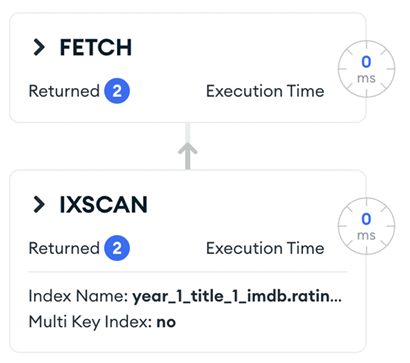
An explain-plan example in MongoDB Compass shows an IXSCAN using a compound index for a movie query filtered by year and rating and sorted by title. Inspecting the plan connects the chosen field order to actual index use. section 7.2.2

















