liveBook · Manning

Sorting algorithm

As explained in Pandas Workout: 200 exercises to make you a stronger data analyst

Sorting orders tabular records according to the values of an index or one or more columns.

Sorting reorders the rows of a pandas DataFrame so that values become easier to inspect, compare, or rank. Use sort_index to order by index values; use sort_values to order by one or more data columns. The original row order often does not affect calculations such as a mean, but it strongly affects how results are displayed and which records appear first. section 6.0 section 6.1

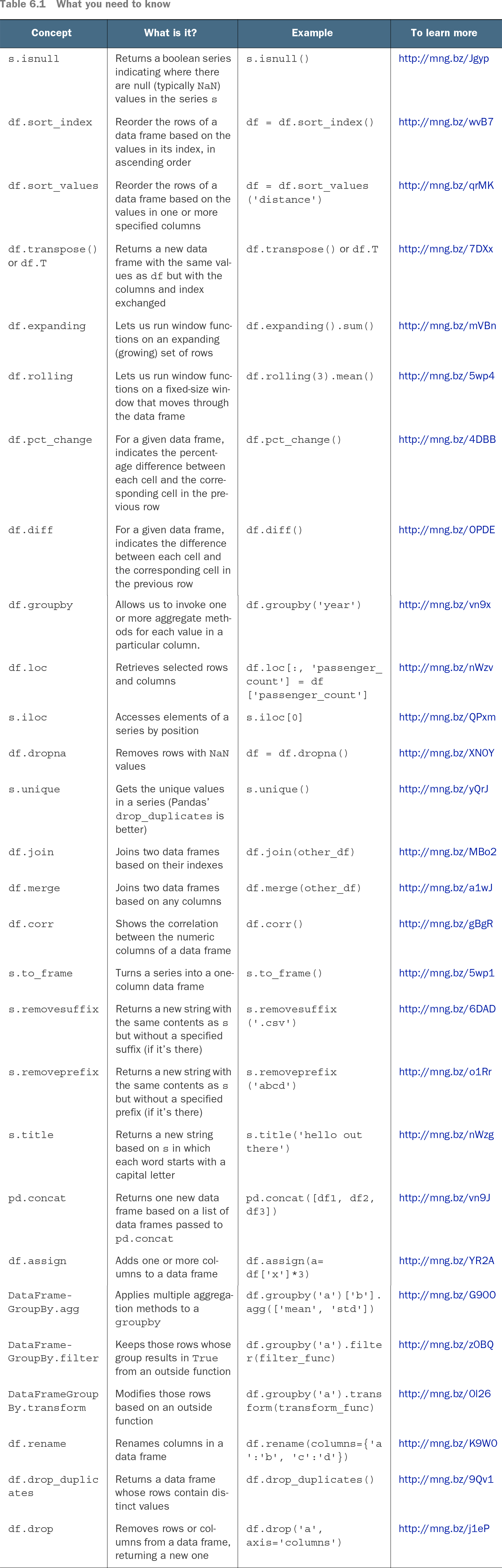
Table 6.1 What you need to know (view table figure)

Concept

What is it?

Example

To learn more

s.isnull

Returns a boolean series indicating where there are null (typically NaN) values in the series s

s.isnull()

http://mng.bz/Jgyp

df.sort_index

Reorder the rows of a data frame based on the values in its index, in ascending order

df = df.sort_index()

http://mng.bz/wvB7

df.sort_values

Reorder the rows of a data frame based on the values in one or more specified columns

df = df.sort_values('distance')

http://mng.bz/qrMK

df.transpose() or df.T

Returns a new data frame with the same values as df but with the columns and index exchanged

df.transpose() or df.T

http://mng.bz/7DXx

df.expanding

Lets us run window functions on an expanding (growing) set of rows

df.expanding().sum()

http://mng.bz/mVBn

df.rolling

Lets us run window functions on a fixed-size window that moves through the data frame

df.rolling(3).mean()

http://mng.bz/5wp4

df.pct_change

For a given data frame, indicates the percentage difference between each cell and the corresponding cell in the previous row

df.pct_change()

http://mng.bz/4DBB

df.diff

For a given data frame, indicates the difference between each cell and the corresponding cell in the previous row

df.diff()

http://mng.bz/OPDE

df.groupby

Allows us to invoke one or more aggregate methods for each value in a particular column.

df.groupby('year')

http://mng.bz/vn9x

df.loc

Retrieves selected rows and columns

df.loc[:, 'passenger_count'] = df['passenger_count']

http://mng.bz/nWzv

s.iloc

Accesses elements of a series by position

s.iloc[0]

http://mng.bz/QPxm

df.dropna

Removes rows with NaN values

df = df.dropna()

http://mng.bz/XN0Y

s.unique

Gets the unique values in a series (Pandas’ drop_duplicates is better)

s.unique()

http://mng.bz/yQrJ

df.join

Joins two data frames based on their indexes

df.join(other_df)

http://mng.bz/MBo2

df.merge

Joins two data frames based on any columns

df.merge(other_df)

http://mng.bz/a1wJ

df.corr

Shows the correlation between the numeric columns of a data frame

df.corr()

http://mng.bz/gBgR

s.to_frame

Turns a series into a one-column data frame

s.to_frame()

http://mng.bz/5wp1

s.removesuffix

Returns a new string with the same contents as s but without a specified suffix (if it’s there)

s.removesuffix('.csv')

http://mng.bz/6DAD

s.removeprefix

Returns a new string with the same contents as s but without a specified prefix (if it’s there)

s.removeprefix('abcd')

http://mng.bz/o1Rr

s.title

Returns a new string based on s in which each word starts with a capital letter

s.title('hello out there')

http://mng.bz/nWzg

pd.concat

Returns one new data frame based on a list of data frames passed to pd.concat

pd.concat([df1, df2, df3])

http://mng.bz/vn9J

df.assign

Adds one or more columns to a data frame

df.assign(a=df['x']*3)

http://mng.bz/YR2A

DataFrame-GroupBy.agg

Applies multiple aggregation methods to a groupby

df.groupby('a')['b'].agg(['mean', 'std'])

http://mng.bz/G90O

DataFrame-GroupBy.filter

Keeps those rows whose group results in True from an outside function

df.groupby('a').filter(filter_func)

http://mng.bz/z0BQ

DataFrameGroupBy.transform

Modifies those rows based on an outside function

df.groupby('a').transform(transform_func)

http://mng.bz/0l26

df.rename

Renames columns in a data frame

df.rename(columns={'a':'b', 'c':'d'})

http://mng.bz/K9W0

df.drop_duplicates

Returns a data frame whose rows contain distinct values

df.drop_duplicates()

http://mng.bz/9Qv1

df.drop

Removes rows or columns from a data frame, returning a new one

df.drop('a', axis='columns')

http://mng.bz/j1eP

Compare index-based ordering with column-based ordering before choosing the operation that matches the question. section 6.0

Start with the analytical question. Ordering sales by department, network statistics by subnet, or projections chronologically makes a report readable. Ordering a numeric column can also expose its highest or lowest records. Choose ascending order for small-to-large values and descending order for large-to-small values. section 6.1

Find and compare the longest taxi rides

Load passenger_count, trip_distance, and total_amount, then sort trip_distance in descending order to put the longest rides first. Take the first 20 rows and calculate their average total_amount. Repeat with ascending order and compare the result: the ordering direction determines whether the first 20 rows are the longest or shortest rides. For a more detailed ranking, sort first by passenger_count ascending and then by trip_distance descending, then average the first 50 rides. section 6.1

Sorting composes naturally with aggregation. After grouping survey responses by employment type and calculating mean annual compensation, sort the resulting Series in descending order to make the highest averages immediately visible. Clean display-oriented results afterward by dropping missing values and formatting numbers; sorting itself does not make questionable or missing values disappear. section 8.2

Useful habits when ordering results:

  • Sort by index only when the index carries the ordering you need; otherwise sort by named value columns. section 6.0
  • Use descending order before head when investigating the largest values, counts, or proportions. section 8.2
  • Use multiple sort keys when one field organizes groups and another ranks records within them. section 6.1
  • Inspect missing values in ranked summaries, then use dropna when a clean comparison is required. section 8.2

Sorting is a presentation and investigation tool rather than a substitute for analysis. It helps turn grouped means, value counts, pivoted measures, and filtered subsets into ranked outputs that are easier to question. A surprising top result can be a prompt to check missing data, sample composition, or whether the comparison supports the intended claim. section 8.2 section 7.17


How Pandas Workout: 200 exercises to make you a stronger data analyst covers it

How deep it goes
Distinguishes index and column ordering, then practices direction, multiple keys, and sorted aggregation outputs without algorithm internals.
Examples
Uses January 2019 NYC taxi rides and Stack Overflow survey salary summaries to practice ranked comparisons.
What it assumes
Assumes pandas DataFrames and basic aggregation, then develops sorting through concrete analytical questions.
What you can do after
Apply it via pandas sort_values and sort_index to rank records, organize reports, and inspect grouped results.
How it connects
Connects sorting with grouping, joining, indexes, value counts, missing values, and pivot tables.

Also explained in

Compare how 18 books explain sorting algorithm →

Related concepts

This explainer was generated by Manning's knowledge graph from the text of Pandas Workout: 200 exercises to make you a stronger data analyst. The section links point to the parts of the book it draws on.