Text spacing means the space between letters, words, lines, or paragraphs. People may increase it to read with less effort, so web content should remain readable when they change their font settings or use browser extensions. section 4.4.3
The goal is not to choose one perfect spacing value; it is to respect users’ choices without cutting off content or functionality. Avoid fixed sizes and absolute positioning that constrain text. Flexible CSS layouts, such as Flexbox or Grid, can help content adapt. section 4.4.3
When spacing hides a link
A “Read more” link can disappear when increased spacing meets a container with a fixed height and hidden overflow. Check that adjusted text leaves every link and other page content visible. section 4.4.3
Figure 4.7 Content and functionality should not be cut off when users modify font settings, such as increasing line height, character, word, or paragraph spacing. This image shows that some content, in this case, the “read more” link, is no longer visible after applying custom spacing.
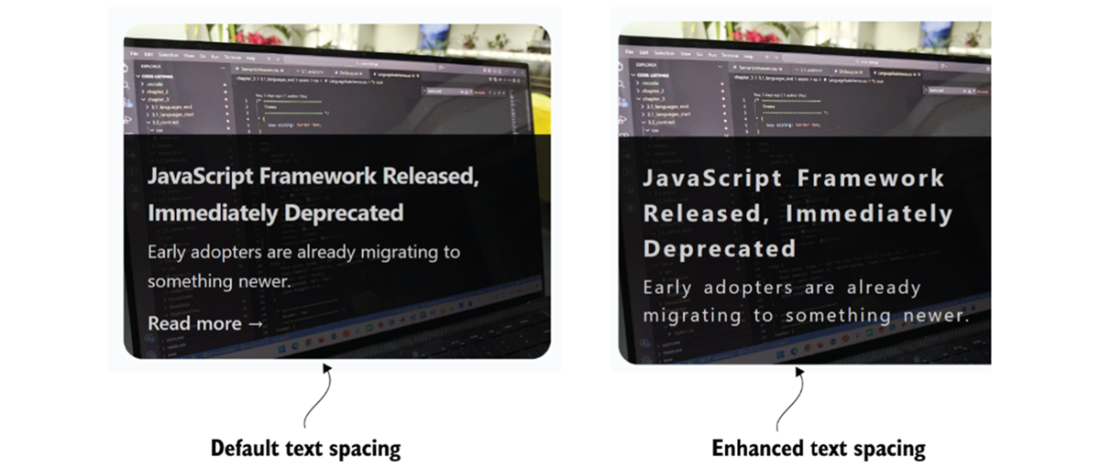
The figure shows a “Read more” link disappearing after custom text spacing is applied. section 4.4.3