liveBook · Manning

Certificate

As explained in .NET in Action, Second Edition

A certificate is a digitally signed credential that binds an identity to a public key for establishing authenticated secure connections.

A certificate enables HTTPS by securing communication between a client and service. Publicly exposed applications need a certificate from a trusted authority; development can use the .NET development certificate. section 9.3

Apply certificates according to the deployment environment:

  • Install a trusted certificate for a publicly exposed service. section 9.3
  • Run `dotnet dev-certs https --trust` to install a trusted development certificate. section 9.3
  • Combine HTTPS certificates with `app.UseHttpsRedirection()` when HTTP requests should redirect to HTTPS. section 9.3

Development HTTPS

Install the development certificate with `dotnet dev-certs https --trust`, then verify that an HTTP request receives a 307 redirect with an HTTPS `Location` header. section 9.3
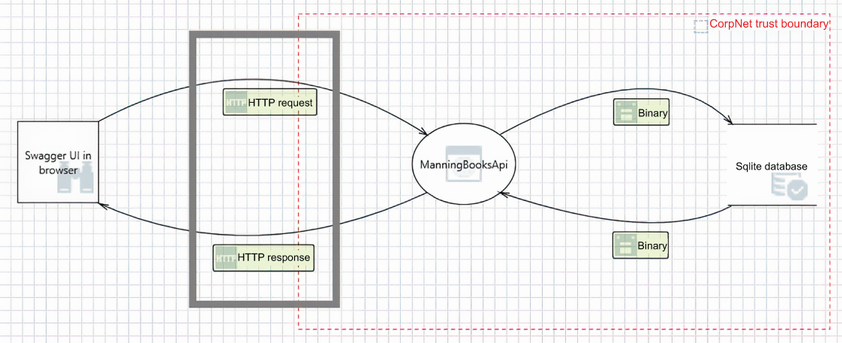
Figure 9.2 The threat model with the HTTP request and response highlighted

Shows the interception threat that HTTPS and certificates address. section 9.3

How .NET in Action, Second Edition covers it

How deep it goes
Explains trust requirements, development installation, and HTTPS redirection, but does not detail certificate internals.
Examples
Uses `dotnet dev-certs https --trust`, `app.UseHttpsRedirection()`, and a 307 redirect with an HTTPS location.
What you can do after
Operate/configure HTTPS in ASP.NET Core using development certificates, trusted production certificates, and redirection middleware.
How it connects
Connects certificates with HTTPS, HTTP, HTTPS redirection, trusted authorities, reverse proxies, and HSTS.

Also explained in

Compare how 15 books explain certificate →

Related concepts

This explainer was generated by Manning's knowledge graph from the text of .NET in Action, Second Edition. The section links point to the parts of the book it draws on.













