A digital certificate is an identity document for a website. It proves that a server is authorized to use a domain and lets a browser establish HTTPS, encrypting communication between users and the app. A trusted Certificate Authority issues the certificate after verifying domain ownership. section 12.4.2
Enable a certificate for a deployed app by completing these steps:
- Use a custom domain rather than the default Elastic Beanstalk domain, because a Certificate Authority cannot verify control of Amazon’s default domain. section 12.4.1
- Request a public certificate in AWS Certificate Manager for the app’s fully qualified domain name, then add the supplied CNAME records to DNS to prove ownership. section 12.4.2
- Attach the issued certificate to the Elastic Beanstalk load balancer by adding an HTTPS listener on port 443. section 12.4.3
Securing a deployed Streamlit app
For www.factfrenzyapp.com, request a public certificate in AWS Certificate Manager, validate ownership with the displayed DNS CNAME record, and select the issued certificate when adding an HTTPS listener on port 443. The browser can then confirm that the connection is secure. section 12.4.2 section 12.4.3
Figure 12.12 Adding an HTTPS listener and a certificate to the load balancer
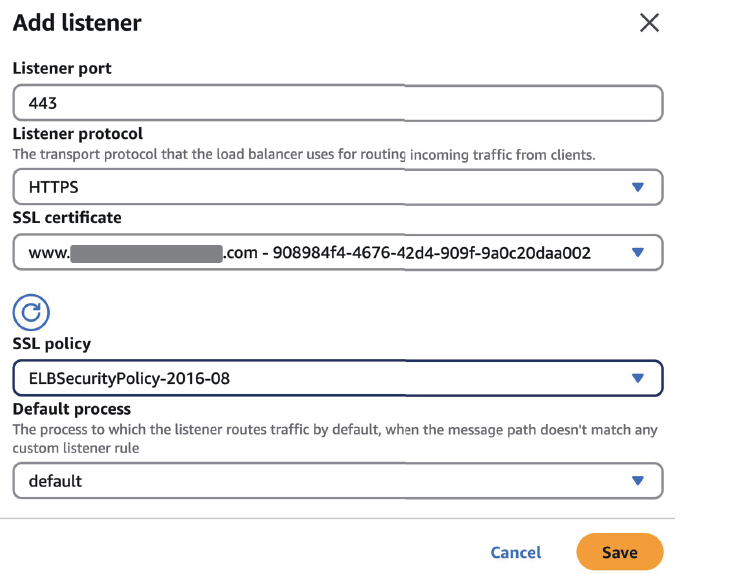
Use the configuration view to see how an HTTPS listener and certificate are attached to the load balancer. section 12.4.3














