Static analysis examines code without running it and flags suspicious, confusing, or likely erroneous patterns. It acts like automated code review for recurring mistakes, but it does not replace human review: pattern-based checks miss many defects that a person can recognize. section 1.3
Use editor analysis for immediate feedback and whole-project or CI analysis for broader reporting. In-editor checks are convenient but typically perform limited interprocedural analysis, so changes can affect call sites that are not currently visible. section 1.3.3
Treat findings as evidence to investigate, not commands to obey:
- Inspect the language behavior and intent before accepting a quick fix; added parentheses can preserve a wrong shift expression rather than correct it. section 2.1.1
- Configure rules for the project rather than accepting irrelevant advice, such as a logging recommendation for a small research program. section 1.3.3
- Suppress a justified finding at the narrowest possible scope and explain why; broad suppression can hide later, useful warnings. section 1.3.4
- Combine analysis with code review and automated tests, because each technique catches different bug classes. section 1.8
Incorrect shift amount
In Java, shifting an int by 32 bits has no effect and is likely erroneous. IDE plugins can underline the expression, list it as a problem, and offer the rule description or controls to deactivate it. section 1.3.2
Java tooling ranges from IDE inspections and plugins such as IntelliJ IDEA and SonarLint to build-integrated Error Prone. Other options include PMD, SpotBugs, PVS-Studio, and CodeQL; their analysis depth, language coverage, and integration differ. section 1.3.1 section 1.3.2
Figure 1.5 A static analysis additional warning menu that allows you to suppress the warning, edit inspection options, or disable the inspection
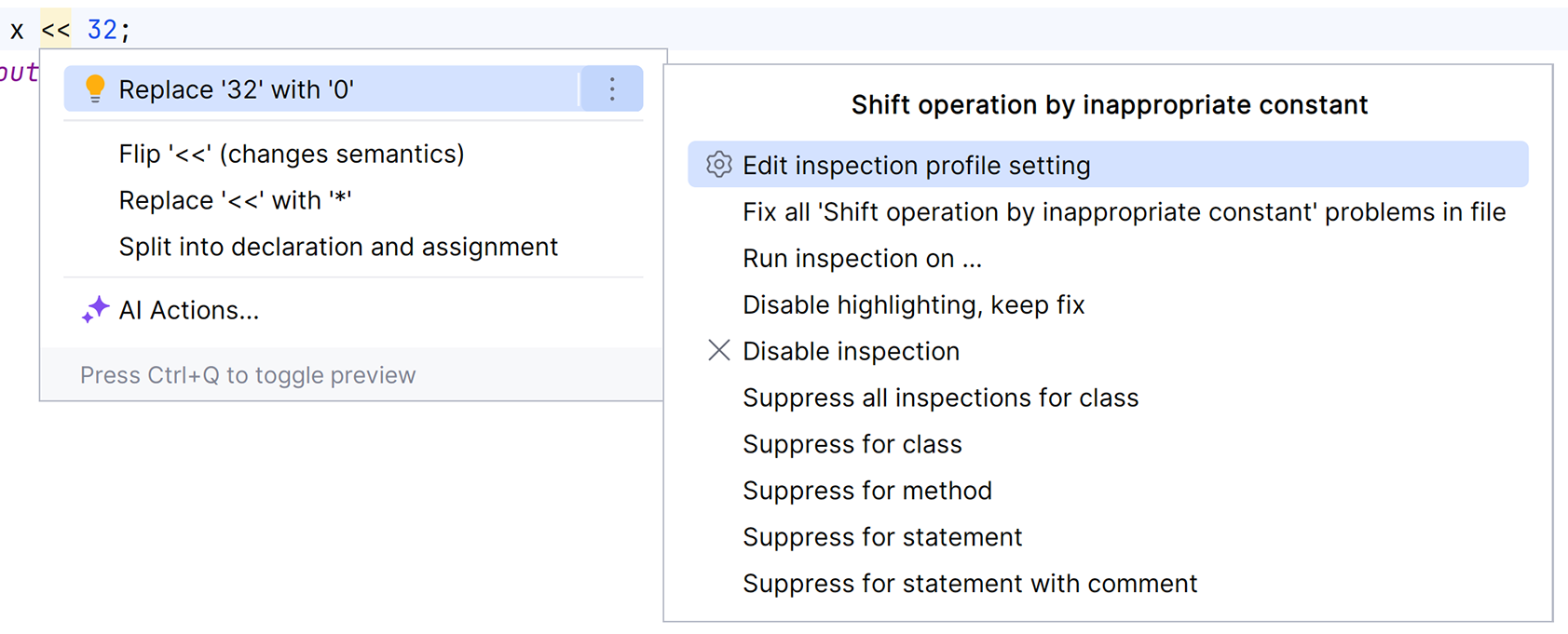
Use the warning menu to examine an inspection before choosing a local suppression, changing its options, or disabling it. section 1.3.2





