An Azure storage account is an Azure resource used to store files uploaded by automation. It belongs in a resource group and provides the storage boundary used by Azure Storage operations. section 8.2 section 8.4
Provisioning a storage account requires several operational decisions:
- Choose a globally unique name containing 3–24 lowercase letters and numbers; appending a timestamp helps avoid collisions. section 8.2.3
- Select a region compatible with related resources such as an Azure Automation account and Log Analytics workspace. section 8.2.3
- Configure the account with a resource group, location, SKU, and access tier; the demonstrated configuration uses Standard_LRS and Cool. section 8.2.3
- Use a storage context authenticated with an account key, then organize uploaded files in containers that can separate content and access. section 8.4
ZIP archive upload automation
A PowerShell runbook checks a local folder for ZIP files, obtains a storage account key, creates a storage context and container, verifies whether each blob already exists, uploads missing files, and deletes local files only after a successful upload. Azure Storage cmdlets provide built-in hash checks that allow execution to stop when an upload fails. section 8.4
Figure 8.1 Azure resources required for the storage upload automation. All resources are grouped into a single Resource Group, which resides under a subscription.
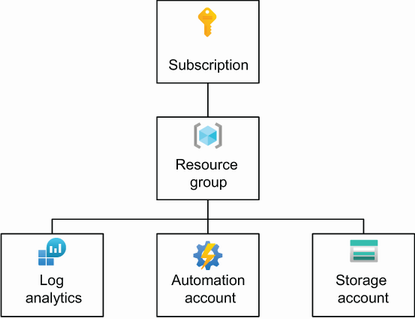
Shows how the storage account fits with the resource group, Azure Automation account, and Log Analytics workspace required for storage-upload automation. section 8.2



