A CSS style property is a named setting that controls one part of a page’s appearance. Think of each property as a small creative control: color changes text color, font-size changes text size, and margin controls surrounding space. Give a property a value, and the browser carries out that instruction. section 1.17 section 1.23
Build a property declaration in small steps:
- Choose the element with a selector, such as h1. section 1.17
- Write the property name, such as font-size or text-align. section 1.17 section 1.20
- Add a colon, the value, and a semicolon. Include a unit when needed, such as px for pixels. section 1.17
- Wrap one or more declarations in braces to make a CSS rule. section 1.23
A heading with three style properties
h1 { font-size: 36px; text-align: center; font-variant: small-caps; } Here, font-size sets the heading’s size, text-align centers it, and font-variant displays it in small capitals. Try changing one value at a time in the Web Design Playground and notice what moves or changes. section 1.20 section 1.23
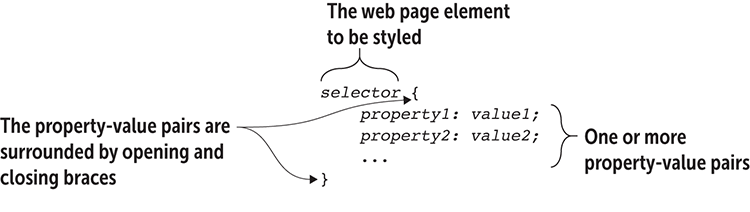
Use the syntax figure as a visual checklist for the selector, braces, property name, value, unit, and semicolon. section 1.17



