A CSS property is a named setting that controls one part of a page’s appearance. Think of it as a tiny instruction for the browser: color changes text color, font-size changes text size, and margin changes the space around an element. Give a property a value, and together they form a declaration. section 2.3
Figure 2.4 The syntax to use for defining CSS properties
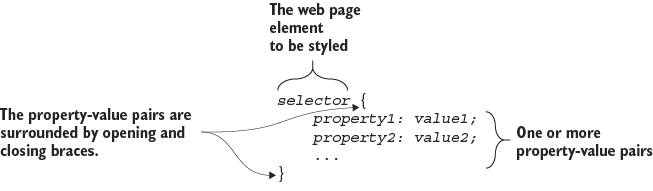
A style rule has a selector to choose elements, curly braces to hold the instructions, and one or more property-value declarations inside. section 2.3
Set a heading size
To make every h1 heading 36 pixels tall, choose h1, then add font-size: 36px; inside the braces. The colon separates the property from its value; the semicolon ends the declaration. Add more declarations to style the same elements. section 2.3
CSS properties can handle visible jobs such as:
- Formatting text with properties for color, font size, typeface, alignment, small caps, or italics. section 2.3 section 4.7
- Sizing, spacing, and separating elements with width, height, padding, borders, and margins. section 9.0
- Applying global styling while building page sections such as headers, introductions, links, and footers. section 5.7
PLAY: Type a property definition in a CSS editor, check the browser result, then change the value and look again. CSS is much less mysterious when you can see each small instruction do its thing. section 1.5



