A quick click does not guarantee a quick response. In a browser’s single-threaded JavaScript execution model, an event-loop task runs to completion before another task can run. Work created in the meantime waits in a queue. section 13.1.1
What counts as a task?
- Macrotasks are discrete browser actions, including evaluating mainline JavaScript and handling events. section 13.1.1 section 13.4
- Microtasks are smaller jobs intended to run as soon as possible; promise callbacks and DOM mutation changes are examples. The event loop usually has separate macrotask and microtask queues. section 13.4
- Timer expiry adds work to the queue; it does not interrupt the current task. A timer delay therefore does not promise that its callback will start at that exact time. section 13.2.1
Two clicks during one long task
Suppose mainline code runs for 15 ms. Clicks arrive at 5 ms and 12 ms, but neither handler can interrupt it. After mainline code finishes, an 8 ms handler runs, followed by a 5 ms handler. The second click waits until 23 ms to begin processing. That’s why a busy task can make an eager user feel ignored. section 13.1.1
Figure 13.2. This timing diagram shows how events are added to the task queue as they occur. When a task is done executing, the event loop takes it off the queue, and continues by executing the next task.
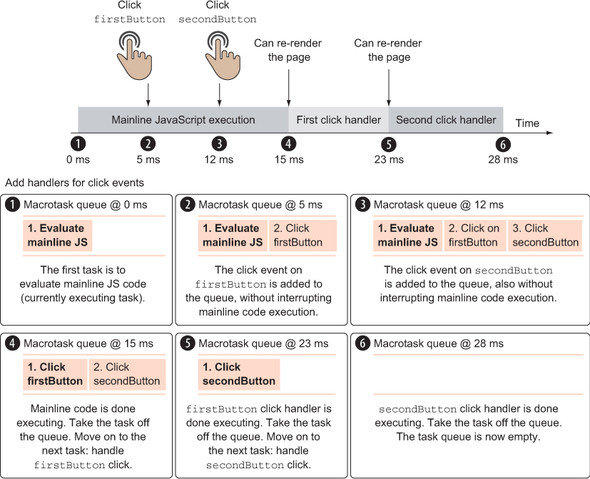
Follow the execution timeline alongside the queue to see clicks arrive while mainline code is still running. section 13.1.1
Timers face the same wait. In a scenario with 18 ms of mainline work, a click at 6 ms and timer events at 10 ms all queue up rather than taking over. A repeating interval can even skip adding a new task when one from that interval is already waiting. Keep expensive work in manageable chunks when browser responsiveness matters. section 13.2.1 section 13.4
Figure 13.12. If an interval event fires, and a task is already associated with that interval waiting in the queue, a new task isn’t added. Instead, nothing happens, as is shown for the queues at 20 ms and 30 ms.
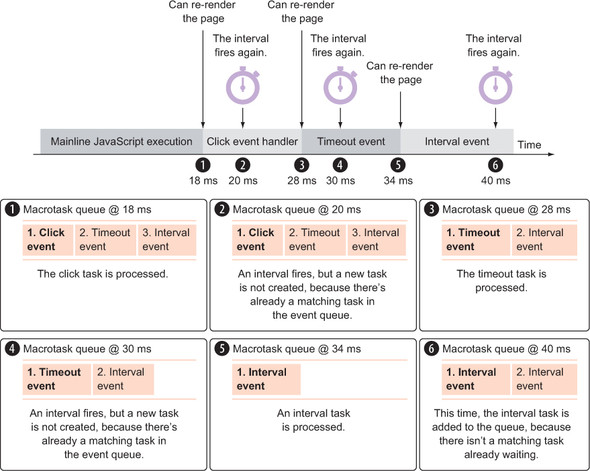
See why an interval does not keep piling up waiting tasks for every firing. section 13.2.1









