A test automation framework supplies conventions, APIs, and execution support for automated tests. It lets you run a suite instead of manually checking each scenario, while keeping test code separate from application logic. section 35.0
A .NET test project combines several pieces:
- The .NET Test SDK identifies and supports test projects. section 35.2
- A framework such as xUnit, MSTest, or NUnit provides test conventions and assertion helpers. section 35.0 section 35.7
- A runner adapter connects the framework to Visual Studio Test Explorer or the dotnet test command. section 35.7
A small xUnit test
A [Fact] method follows Arrange, Act, Assert: create a CurrencyConverter, call ConvertToGbp with value 3 and rate 1.5, then use Assert.Equal to verify the expected result of 2. A [Theory] adds several [InlineData] sets, creating separate runs without duplicating the test method. section 35.5
Figure 35.1 The New Project dialog box in Visual Studio. Choose xUnit Test Project to create an xUnit project, or choose Unit Test Project to create an MSTest project.
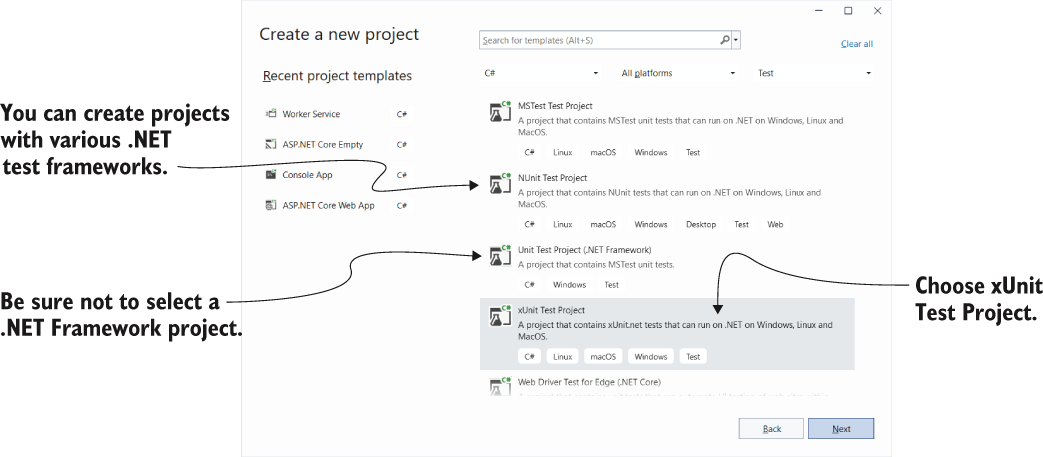
Use the Visual Studio project dialog to create an xUnit test project; the equivalent CLI command is dotnet new xunit. section 35.2
Good tests verify observable behavior, including failure conditions. Assert.Throws checks that invalid input raises the expected exception type, while avoiding dependence on internal implementation details that could make tests brittle. section 35.6



