Tool use lets an LLM request external operations, such as API calls, database queries, or local code execution. The model emits a structured request; an agent harness validates and executes it, then returns the result to the model. This separates probabilistic reasoning from external execution. section 4.2 section 1.5.3
Tool definitions put names, descriptions, and argument schemas in the context window. The resulting calls and outputs usually join the working context; only relevant outputs are later persisted as memory. Tools therefore extend both what an agent can do and what the model knows when it generates a response. section 1.5.3 section 4.6.1
A function-calling cycle has four main steps:
- The harness assembles the prompt, instructions, active state, and tool definitions for the model. section 4.2
- The model returns a call identifier, function name, and typed arguments. section 4.2
- The harness validates and executes the request, then adds the call and its output to the message history, matched by identifier. section 4.2
- A second model call uses the result to generate a grounded response. Identifiers also allow multiple tool calls to be correlated with their outputs in a single turn. section 4.2
Figure 4.2 Function calling workflow: tool definitions and the user prompt enter the context window, a first model call returns a tool call, the tool executor runs it, and a second model call turns the tool output into the final answer
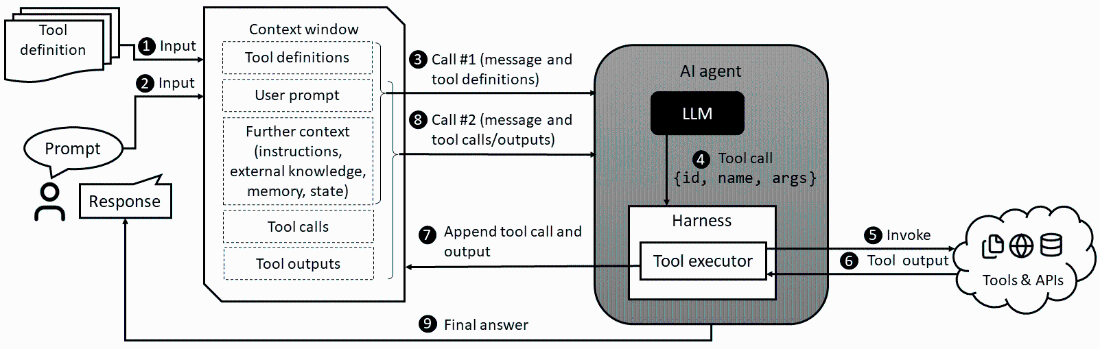
Follow the data flow between the context window, model, harness, and external tool. section 4.2
Function calling uses predefined, schema-described capabilities. A CLI lets an agent drive local executables through a shell, while MCP provides a protocol for servers to expose tools, resources, and prompts. These paradigms share the pattern of a model producing an invocation for the harness to execute. section 1.5.3 section 4.7
Weather lookup
A Python application exposes a mock weather function to an OpenAI model. It sends the function definition with the prompt, executes the requested function, and adds the returned weather value to the model’s context for the final answer. section 4.6.1
Listing 4.1 Python script using an OpenAI model and a mock weather tool
from openai import OpenAI
import json

client = OpenAI()

TOOLS = [{ #1
    "type": "function",
    "name": "get_weather", #2
    "description": "Get the current weather in a location",
    "parameters": {
        "type": "object",
        "properties": {
            "location": {
                "type": "string",
                "description": "City or place name"
            }
        },
        "required": ["location"]
    }
}]

def query_model(prompt, model="gpt-4o-mini"):
    response = client.responses.create( #3
        model=model,
        input=prompt,
        tools=TOOLS,
        tool_choice="required",
    )
    input_items = list(response.output)
    for item in response.output: #4
        if item.type != "function_call":
            continue
        function_name = item.name
        function_args = json.loads(item.arguments)
        result = route_function_call(function_name, function_args) #5
        input_items.append({
            "type": "function_call_output",
            "call_id": item.call_id,
            "output": json.dumps(result),
        })
    final_response = client.responses.create( #6
        model=model,
        input=input_items,
        tools=TOOLS,
    )
    return final_response.output_text
Inspect the Python tool definition and model request used in the weather example. section 4.6.1
Each tool cycle adds calls and outputs to the active context and requires at least two model calls, so long loops can consume context capacity quickly. Because tools can act on external systems, apply controls such as least-privilege permissions, argument validation, sandboxing, approval gates, and invocation tracing. section 4.2 section 4.7