A tree organizes hierarchical data as nodes connected through levels. The top node is the root, intermediate nodes group lower-level nodes, and leaves occupy the bottom. A node can hold a different datatype from another node. section 11.2
A practical tree design commonly includes:
- Parent or composite nodes aggregate objects at the next level, while leaf nodes represent individual data objects. section 11.2.2
- A traversal begins at the root and visits nodes downward, allowing multiple algorithms to process the same collection. section 11.2
- A tree can support operations such as printing hierarchical data, counting items, or calculating totals. section 11.2
- When different operations change more often than the hierarchy, Visitor separates report algorithms from the node classes. section 11.3
Intramural reports
An Intramural root contains Sport nodes; each Sport contains Game nodes; and Hall objects serve as leaves or separately tracked referenced objects. Traversing the tree produces scores, activity counts, and winnings reports. Each node accepts a visitor, which dispatches to the appropriate operation for that node type. section 11.2.2 section 11.3
Figure 11.4 An example tree data structure of hierarchical data for a store. Store is the root node. The intermediate tree nodes are store departments Produce, Soups, and Soaps; categories Vegetables and Fruits in the Produce Department; and categories Bar, Dish, and Laundry in the Soaps Department. The leaf nodes at the bottom (shaded in gray) are the products.
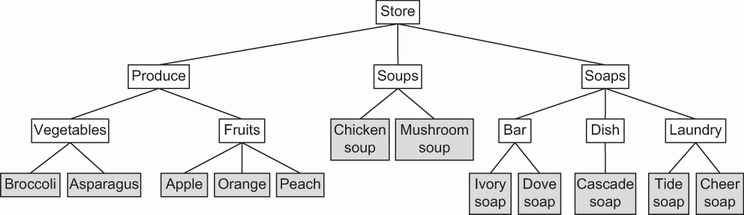
Use the store hierarchy to see a root, departments, categories, and product leaves arranged as one tree. section 11.2










