A tree is a hierarchical data structure whose nodes connect through parent-child relationships. The top node is the root; nodes at the bottom are leaves. Nodes may come from different classes and hold different datatypes. section 11.2
A tree supports several practical operations:
- Organize related objects into nested levels, such as store, department, category, and product. section 11.2
- Traverse from the root downward, visiting every node during a pass. section 11.2
- Apply different algorithms to the same collection, such as printing hierarchy, counting activities, or calculating revenue. section 11.2
- Represent a hierarchy with aggregation: Intramural contains sports, sports contain games, and games refer to hall leaves. section 11.2.2
Intramural sports reports
An Intramural root contains baseball, football, and volleyball Sport nodes. Each Sport contains Game nodes, while each Game refers to winning and losing Hall leaf nodes. Traversing the tree produces scores and activity counts; a separate hall list supports the winnings report. section 11.2.2
Figure 11.5 An example tree data structure of hierarchical data for a store. Store is the root node. The product nodes at the bottom (shaded in gray) are the leaf nodes.
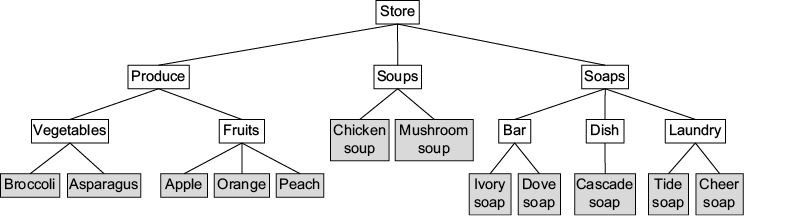
Use the store hierarchy to inspect root, intermediate nodes, categories, and leaf products. section 11.2










