A use case is a named interaction scenario that describes how an external actor performs a sequence of actions with an application to achieve a particular goal. Written from the triggering actor’s point of view, it connects requirements to runtime behavior and helps identify the application’s major capabilities. section 3.6 section 3.9
Document each use case with a short verb–noun name and enough structure to make its behavior verifiable:
- State the goal, summary, actors, preconditions, and trigger. section 3.6.2
- Describe a primary action sequence of no more than about ten steps; split the use case if it becomes more complex. section 3.6.2
- Add alternate action sequences for failures, postconditions for the finished situation, applicable nonfunctional requirements, and a glossary. section 3.6.2
Search Catalogue
A customer searches a book catalogue by entering target book attributes in an online form and selecting Search. The use case’s goal is to find matching books and return a list of results. Its actors, trigger, primary steps, alternate outcomes, and postconditions turn a broad search requirement into an observable interaction. section 3.6.2
Figure 3.4 A UML use case diagram containing the names of six use cases for an advanced version of our book catalogue application. The labels in the dashed boxes and the dashed arrows indicate the various components of the diagram. When drawing a use case diagram, do not include these labels and arrows.
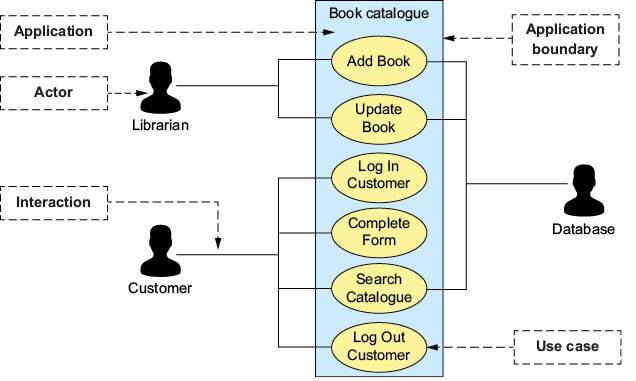
A UML use case diagram groups related use cases inside the application boundary and shows which external actors can interact with each one. Use short, descriptive verb–noun labels such as Add Book and Log In Customer. section 3.6.1






