A use case describes what a user needs to achieve through a high-level action, process, or flow. In API design, it keeps attention on user outcomes rather than databases, implementation components, or programming representations. section 2.1.2 section 2.3.2
Use cases help identify API capabilities before choosing endpoints or data models. Treat each use case as a recipe and its steps as clues for finding generic operations that can serve several contexts. section 2.1 section 2.1.3
Analyze a use case in a practical sequence:
- Identify the relevant user, such as a customer, consumer, administrator, or end user. section 2.1.2
- Name the user’s desired outcome in plain language, such as “Buy products” or “Send a message to a friend.” section 2.3.2 section 2.1.2
- Decompose the outcome into observable steps without prematurely converting them into endpoints or implementation details. section 2.3.3
- Compare the steps across use cases and extract versatile operations rather than operations tied to one narrow scenario. section 2.1.3
- Review prioritized, alternative, and problem-focused use cases so edge users and failure situations are not omitted. section 2.3.2 section 2.4.3
From shopping goal to API capabilities
For an online shopping application, “Buy products” is the use case. Its steps are “Add a product to the cart” and “Check out.” Those steps can guide generic operations, while a narrow operation such as “Buy Christmas presents” would unnecessarily constrain reuse. A later design pass can optimize the resulting flow for usability and interoperability. section 2.3.2 section 2.3.3 section 10.2.1
Figure 2.1 We analyze the needs from the Define stage of the API lifecycle to identify the versatile API capabilities that meet them and other unknown needs. We’ll iterate with the Define and Design stages stakeholders.
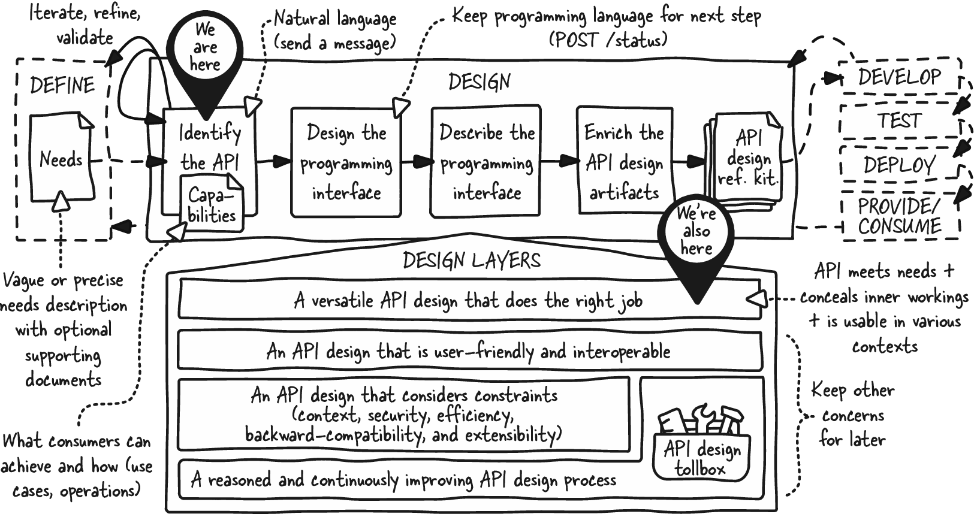
Use the lifecycle view to place use-case analysis after defining user needs and before programming-interface design, with iteration among stakeholders. section 2.1






