A user profile stores application-specific data beside a Django User account instead of cramming every domain detail into the account itself. It is a separate model linked by OneToOneField: one account has one profile, and one profile belongs to one account. The profile can then point to richer domain objects such as musicians and venues. section 6.2.1 section 6.2.2
Keep the profile focused on account-associated data. A date of birth may belong directly on it, but a reusable birthday record or a musician record can remain its own model. This separation matters when one person might manage multiple musician profiles, multiple venues, or both; turning a Musician directly into the profile would rule out those relationships. section 6.2.2
A practical Django profile setup has three parts:
- Define UserProfile with a OneToOneField to User and relationship fields for the domain objects the account controls. section 6.2.2
- Add the profile as a Django Admin stacked inline so staff can edit its fields alongside the associated User. section 6.2.2
- Create a profile automatically after a new User is saved, or check that one exists before accessing it. section 6.5
Using a profile for authorization
A restricted musician view first requires login, then reads request.user.userprofile. It allows access when the requested musician is directly in musician_profiles or when one of that user’s musicians shares a band with the requested musician; otherwise it raises a 404. Direct profile access is unsafe if some accounts, such as an admin, have no profile yet. section 6.4 section 6.5
A profile is not the same as a custom User model. Profiles retain Django’s built-in credential mechanism; replacing User permits credential changes such as logging in with an email address, but also requires replacing its manager. Choose early: Django uses one account mechanism at a time, and switching later can require custom migrations and data cleanup. section 6.2.1
Figure 6.2 User profiles vs. replacing the User ORM object for user data storage
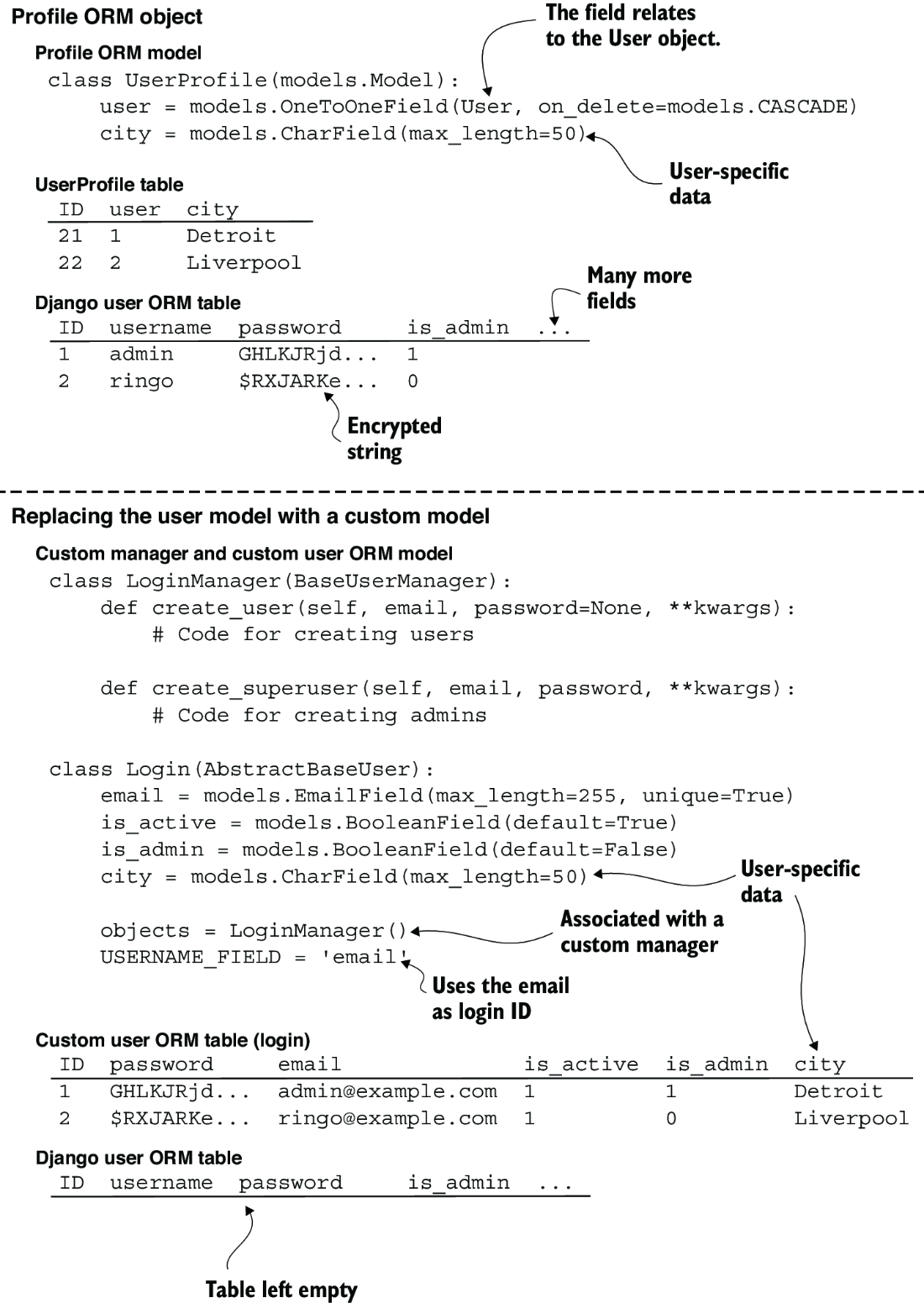
Compare the separate-profile approach with replacing User to see which data and database relationships change under each design. section 6.2.1

