A view is anything a user sees or interacts with onscreen in a .NET MAUI app. Views fall into three practical groups: pages, layouts, and controls. A page fills a screen or window; a layout arranges child elements; and a control displays information or accepts input, such as a Label, Image, Button, Entry, CheckBox, or DatePicker. section 4.1 section 4.0
Views form a rendering hierarchy. The app displays a page, the page renders its single content view, and layouts arrange controls or further layouts. A ContentPage exposes a Content property of type View, so it can contain one Button directly, but it commonly contains a layout or ScrollView that can hold multiple controls. section 4.1 section 7.1
Build a simple view tree
Place a ScrollView inside a ContentPage, then add a VerticalStackLayout. Put an Image, Labels, and a Button inside the layout. The ScrollView keeps overflowing content reachable, while the stack layout places the child controls vertically. section 2.3 section 7.1
A XAML element still represents a class at runtime. For example, an Entry in a view becomes an Entry object whose Text property can be read or set in code. Naming an element with x:Name permits direct code-behind access, although data binding is usually a better way to connect UI properties to application state. section 3.4
Data binding connects a target property on a view to a source property. Built-in UI controls inherit BindableObject, and a view can have one binding context whose properties are available to that view and inherited by child components. Bindings can also explicitly connect properties on separate views. section 3.4
In MVVM, the View owns UI logic: layout and UI behavior such as animation or changing a control’s appearance. The ViewModel owns presentation logic and UI state, while the Model owns business logic. Controls bind to ViewModel properties and commands rather than putting that work in event handlers or code-behind. section 9.3 section 9.3.5
Figure 4.2 An app knows how to render pages, and pages know how to display a single layout. Layouts define how to arrange controls or other layouts on the screen. In this example, an app renders a home page with a Grid layout as a child. The Grid layout here has five child items, including a VerticalStackLayout in the middle. The VerticalStackLayout has three controls as child items: an Image, a Button, and an Entry.
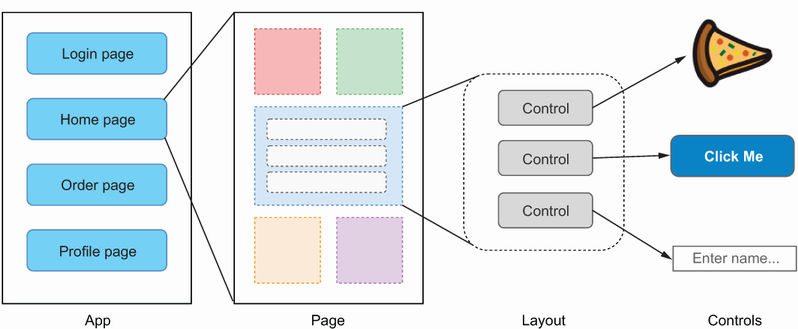
Follow the rendering chain from an app to a page, then through a layout to its child controls. section 4.1

