liveBook · Manning

Virtual switch

As explained in Practical Automation with PowerShell: Effective scripting from the console to the cloud

A virtual switch is software-based network switching infrastructure that connects virtual machines to one another or to physical networks.

A virtual switch is software-based network switching infrastructure that connects virtual machines to one another or to physical networks. In Hyper-V virtual-machine automation, it is one of the values considered when defining a new machine. section 10.5

Treat the virtual switch as an automation parameter according to how much control the deployment requires:

  • Make it mandatory when the initiating person or script must explicitly choose the switch. section 10.5
  • Make it fixed when the automation always uses a predetermined switch. section 10.5
  • Make it optional when a default switch is suitable but users may override it. section 10.5
  • Make it logical when script logic determines the switch and includes a fallback when determination fails. section 10.5
Figure 10.2 Hyper-V virtual machine creation parameters broken down into buckets for mandatory (values that must be supplied), optional (values that have a default value but can be overwritten by the user), fixed (values that are hardcoded), and logical (values that are determined by logic in the script)
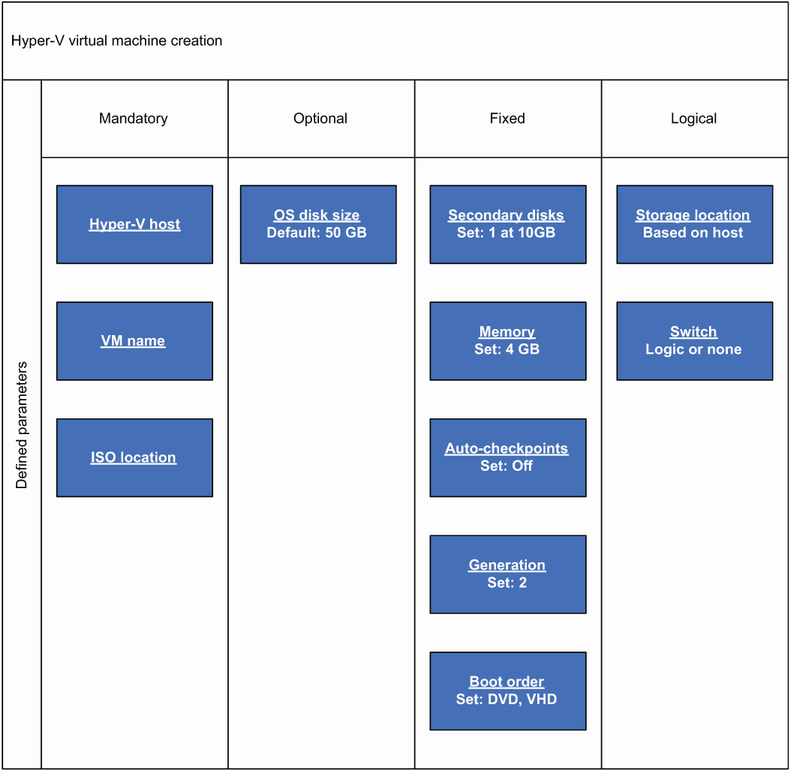
Use the parameter-bucket diagram to decide whether the virtual switch belongs among mandatory, optional, fixed, or logical inputs. section 10.5


How Practical Automation with PowerShell: Effective scripting from the console to the cloud covers it

How deep it goes
Classifies the virtual switch as an automation parameter but does not explain switching internals or network configuration.
Examples
Uses a Hyper-V virtual-machine creation parameter list and a diagram dividing inputs into four parameter buckets.
What it assumes
Assumes familiarity with Hyper-V virtual-machine creation and scripting, while defining parameter categories explicitly.
What you can do after
Operate/configure it by selecting an appropriate mandatory, fixed, optional, or logical automation parameter strategy.
How it connects
Connects virtual switches with Hyper-V, virtual machines, automation parameters, and deployment scenarios.

Also explained in

Compare how 3 books explain virtual switch →

Related concepts

This explainer was generated by Manning's knowledge graph from the text of Practical Automation with PowerShell: Effective scripting from the console to the cloud. The section links point to the parts of the book it draws on.
